


Master the UAE
E-Invoicing Mandate
with TallyPrime.
Ensure 100% FTA compliance by generating valid UBL XML invoices effortlessly within TallyPrime. Stay ahead of the UAE e-invoicing regulations and focus on growing your business — not navigating paperwork.

The Challenge
Navigating the Complexities of UAE E-Invoicing?
The Federal Tax Authority’s new e-invoicing mandate introduces significant technical and operational challenges for VAT-registered businesses across the UAE.
Complex UBL XML Technical Requirements
The FTA mandates invoices in Universal Business Language (UBL) XML format — a highly structured, technical standard that is time-consuming and error-prone to generate manually without dedicated software.
Confusing Phased Implementation Timeline
The UAE e-invoicing rollout is happening in waves. Understanding which phase applies to your business — and by when — requires constant monitoring of FTA announcements and regulatory updates.
High Risk of Data Errors & Rejections
A single field error in a UBL XML invoice can result in rejection by the FTA's platform. Manual data entry greatly amplifies this risk, leading to costly delays and operational disruptions.
Penalties for Non-Compliance
Non-compliance with the FTA e-invoicing mandate exposes businesses to significant financial penalties under UAE VAT law — a risk no business operating in the UAE can afford to ignore.
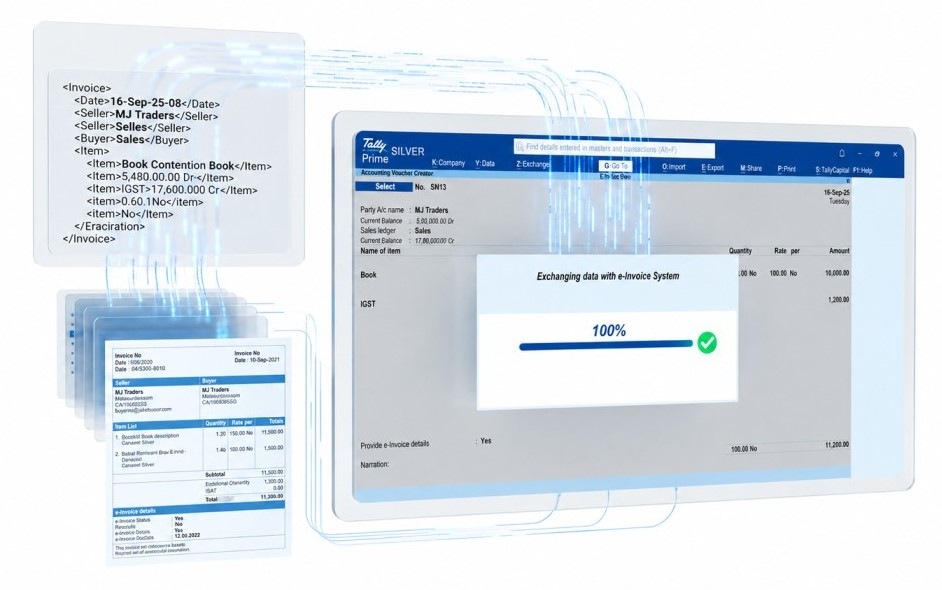
TallyPrime E-Invoice Module
The Simplest Way to Stay FTA-Compliant
TallyPrime's E-Invoice module works inside the software you already use every day. There is nothing new to learn, no separate portal to log into, and no manual XML formatting to worry about. Compliance happens automatically as part of your normal invoicing process.
🛡️ Built for UAE Businesses Every feature in this module is designed specifically for the FTA's UBL XML standard and the UAE's phased e-invoicing rollout — not a generic global solution adapted for the UAE.
- Generates FTA-approved UBL XML invoices automatically from your existing TallyPrime data — no manual reformatting needed
- Built-in real-time validation catches errors before submission to the FTA portal, eliminating rejection risk
- Fully aligned with the UAE e-invoicing phased implementation schedule — updated automatically as new phases are announced
- Seamlessly integrated with TallyPrime VAT returns, tax reports, and financial statements — one platform for everything
- Complete audit trail of every e-invoice issued — always inspection-ready for the FTA
Automatic UBL Generation
Convert any TallyPrime invoice into a valid UBL 2.1 XML document instantly — no coding or technical knowledge required.
FTA-Compliant Format
Every invoice strictly meets the FTA's schema and mandatory field requirements, ensuring zero-rejection submissions.
Phased Rollout Support
Module updates are released automatically to keep you aligned with each new phase of the FTA's e-invoicing timeline.
Seamless VAT Integration
E-invoicing data flows directly into your VAT returns, P&L, and audit reports — all inside TallyPrime.
Bulk Processing
Generate and submit thousands of compliant e-invoices in a single batch — built for high-volume UAE businesses.
Complete Audit Trail
Every e-invoice is logged with timestamps and status records — always ready for an FTA tax inspection.
Real-Time Validation Engine
Our built-in validation engine checks every invoice against the FTA's UBL XML schema before submission — catching field errors, missing mandatory data, and formatting issues instantly. You will never receive a rejection from the FTA portal because of a data error. This is compliance confidence built directly into your daily workflow.
Simplify E-Invoicing
From Invoice to FTA Compliance in 3 Simple Steps
TallyPrime eliminates the complexity of UBL XML invoicing in the UAE. Here is how effortlessly it works for your business.
Create Your Invoice
Generate your sales invoice in TallyPrime exactly as you always have. Your familiar workflow stays completely unchanged — no retraining required.
Generate UBL XML
Click a single button to instantly convert your invoice into a fully valid, FTA-approved UBL XML e-invoice — automatically formatted, validated, and ready.
Comply & Report
Your compliant e-invoice is ready to share with customers and submit to the FTA platform. VAT reporting and audit records update automatically inside TallyPrime.
Zero Risk of Rejection
Real-time validation checks every field against the FTA's UBL schema before you submit — errors are caught and flagged immediately.
Automatic VAT Sync
Every e-invoice issued flows automatically into your VAT return calculations, tax reports, and P&L — no double entry, ever.
Instant Audit Trail
Every e-invoice is archived with full timestamps and status history — your business is always ready for an FTA inspection at any time.
Ready to see it in action? Watch the entire process happen live in under 30 minutes.
See It Live — Book a Demo →The 5-Corner Network Model
How Peppol E-Invoicing Works in the UAE
The UAE Federal Tax Authority relies on a decentralized 5-corner network (DCTCE) powered by the global Peppol standard. TallyPrime acts as your intelligent gateway, making this technically complex routing entirely invisible to your daily operations. Here is exactly how your invoice travels securely from generation to FTA compliance:

Seller
You create an invoice in TallyPrime exactly as you always do. Behind the scenes, the software instantly structures your data into the mandatory PINT-AE / UBL 2.1 XML format.
Validate
The XML file is pushed to your Accredited Service Provider (ASP), where it undergoes real-time validation against the FTA's strict tax schemas and security rules.
Buyer ASP
Once validated, the document is securely encrypted and routed across the decentralized Peppol network, landing directly at your customer's chosen ASP.
Buyer
Your customer receives a standardized, flawless e-invoice directly into their own accounting system or dashboard for fast processing and approval.
Auto-Share
Simultaneously, the validated tax data is automatically synchronized with the Federal Tax Authority (FTA). Your compliance loop is closed continuously and securely.
Why TallyPrime
Why TallyPrime is the Smart Choice for UAE Businesses
More than just e-invoicing compliance — it is a smarter, more efficient way to run your entire financial operation in the UAE.
Meet Regulatory Requirements
Stay fully compliant with the Federal Tax Authority's e-invoicing mandate — with a solution purpose-built for the UAE's UBL XML standard and PEPPOL network requirements.
Avoid Costly FTA Penalties
Eliminate the risk of non-compliance fines by ensuring every invoice your business issues meets the FTA's technical and legal requirements from day one of the mandate.
Streamline Your Operations
Automate a technically complex process that would otherwise require dedicated IT resources or expensive third-party middleware — saving your team significant time and cost.
Ensure Data Accuracy
Automated UBL XML generation from your live TallyPrime data eliminates the manual re-entry errors that cause FTA rejections and create discrepancies in VAT reporting.
Centralized VAT Management
Manage e-invoicing, VAT returns, tax reports, and compliance records in a single powerful platform — rather than juggling multiple disconnected systems and portals.
Future-Proof Your Business
As the FTA expands its e-invoicing mandate across phases, TallyPrime updates automatically — so your business stays ahead of every new regulatory requirement without any extra effort.
TallyPrime for VAT compliance
with real-time validation on
a fully compliant UBL XML invoice
Social Proof
Trusted by Leading Businesses & CAs Across the UAE
From SMEs to large enterprises, TallyPrime’s e-invoice module is the solution UAE businesses rely on for FTA compliance.
“We integrated our CRM with Tally no more duplicate entries! It saved hours every week and improved billing accuracy instantly.”

Rauf A.
Dubai (Wholesale Business)
“All my online orders flow into Tally automatically. Inventory and sales are updated in real time absolutely seamless.”
Jameel S
Abu Dhabi (Store Owner)
“POS integration with Tally was a game-changer. Daily data sync and reporting became effortless across our 4 branches.”
Arif M.
Sharjah (Retail Chain)
“Matrix Technologies built a smart integration for payroll and accounts one-click sync between HR software and Tally. Flawless results!”
Owais K
Al Ain (Construction Company)
FAQs
Frequently Asked Questions
Everything you need to know about UAE e-invoicing regulations and how TallyPrime makes compliance simple.
The UAE e-invoicing mandate is a regulatory requirement issued by the Federal Tax Authority (FTA) that obligates all VAT-registered businesses to issue, receive, and report invoices electronically in the UBL XML format via an FTA-approved e-invoicing network.
The mandate is built on the PEPPOL (Pan-European Public Procurement On-Line) framework — an internationally recognised standard for electronic document exchange — and is being rolled out in phases, starting with larger businesses and progressively extending to all VAT-registered entities across the UAE.
UBL stands for Universal Business Language. It is an internationally standardised, open library of XML (Extensible Markup Language) schemas for electronic business documents — including invoices, credit notes, and purchase orders.
The FTA requires UBL 2.1 format because it is machine-readable, structured, and globally recognised — allowing the FTA's systems to automatically validate, process, and audit invoice data without any manual handling.
In simple terms: a UBL XML invoice is not a PDF or a Word document. It is a structured data file with clearly defined fields for supplier details, buyer details, line items, VAT amounts, dates, and more — all in a format that computers can read and verify instantly.
All businesses registered for VAT in the UAE are required to comply with the FTA's e-invoicing mandate. The implementation follows a phased approach based on business size and annual turnover threshold — meaning larger enterprises are included first, with SMEs and smaller VAT-registered businesses following in later phases.
This applies to businesses across all sectors — trading, manufacturing, services, real estate, hospitality, healthcare, and more — as long as they are VAT-registered with the FTA.
TallyPrime's dedicated E-Invoice module handles every technical aspect of FTA compliance automatically — so your team does not need to understand XML, PEPPOL, or the FTA's technical specifications.
Here is exactly what TallyPrime does for you:
✅ Converts your standard TallyPrime invoices into FTA-approved UBL XML documents with a single click
✅ Validates every invoice against the FTA's schema in real time before submission
✅ Processes invoices in bulk for high-volume businesses
✅ Maintains a full audit trail of every e-invoice for FTA inspections
✅ Integrates automatically with your existing VAT returns and financial reports
✅ Updates automatically as the FTA announces new phases and requirements
No — and this is one of the biggest advantages of TallyPrime's E-Invoice module. You continue creating invoices in TallyPrime exactly as you always have. Your team does not need retraining. Your workflow does not change.
The only addition to your process is clicking the Generate UBL XML button after creating an invoice. TallyPrime then handles everything else — formatting, validation, and generating the compliant XML file — automatically in the background.
The UAE FTA is rolling out the e-invoicing mandate in a phased approach. Phase 1 targets large VAT-registered businesses above a specified annual turnover threshold. Subsequent phases progressively extend the mandate to medium and smaller businesses over time.
The FTA publishes updated timelines, criteria, and technical specifications on its official portal as each phase approaches. It is important to monitor these announcements or work with a certified TallyPrime partner — like Matrix — who tracks every FTA update and ensures your software is always aligned.
TallyPrime generates invoices in the UBL 2.1 XML format required by the UAE's FTA-mandated e-invoicing framework, which is built on the PEPPOL network standard. The UBL XML files produced by TallyPrime are structured to be fully compatible with approved UAE Access Points for onward submission to the FTA's centralised e-invoicing platform.
Our Matrix implementation team guides you through the complete process — from TallyPrime setup to Access Point connection and FTA submission — so you never have to navigate the technical infrastructure alone.
Still have questions about UAE e-invoicing compliance?
Our team of FTA compliance experts is ready to answer any question specific to your business — at no cost and no obligation. Talk to a Compliance Expert →Act Now
Get Your Business FTA-Compliant — Starting Today.
Do not wait for the FTA deadline to catch up with you. Our UAE-based team of TallyPrime and VAT compliance experts is ready to assess your current setup, walk you through the e-invoicing module, and get your business generating compliant UBL XML invoices — faster than you think.
Free Compliance Assessment
We evaluate your current invoicing setup and identify exactly what is needed for full FTA compliance — at no cost and no obligation.
Live TallyPrime Demo
See the entire UBL XML generation process in action with your own invoice data — completed in under 30 minutes.
Dedicated UAE Implementation Support
Our local team provides hands-on onboarding, staff training, and post-go-live support so your transition is completely smooth.
Businesses that delay e-invoicing implementation risk operational disruption, VAT reporting errors, and direct FTA penalties. The time to act is now — before your phase deadline is announced.
Book Your Free Demo
Fill in your details and our UAE compliance experts will be in touch within one business day.
By submitting this form, you agree to our Privacy Policy. We’ll never share your information with third parties. Expect a response within 1 business day.