

Futuristic image showing the Dubai skyline and a transparent digital invoice interface. The invoice displays ABC Trading LLC with a Verified status, connected to the Peppol and PINT AE networks, illustrating TallyPrime's ASP approved e-invoicing capabilities.

Future-Proof Your Business: The Ultimate Guide to TallyPrime UAE E-Invoicing & FTA Compliance

Let’s address the elephant in the Dubai boardroom: the UAE’s tax and compliance landscape is evolving faster than ever. From the stabilization of Corporate Tax to the sweeping mandates of the new E-Billing System, the days of relying on disjointed spreadsheets or generic global software are over. The Federal Tax Authority (FTA) expects real-time, error-free reporting, and the penalties for non-compliance are severe. If you are scrambling to find the right UAE e-invoicing software, you are not alone. Enter TallyPrime UAE e-invoicing—a solution specifically engineered not just to meet these aggressive new standards, but to turn your accounting department into a stress-free, well-oiled machine.

Here is why upgrading to an ASP approved software UAE ecosystem like TallyPrime is the most profitable decision your business will make this year.
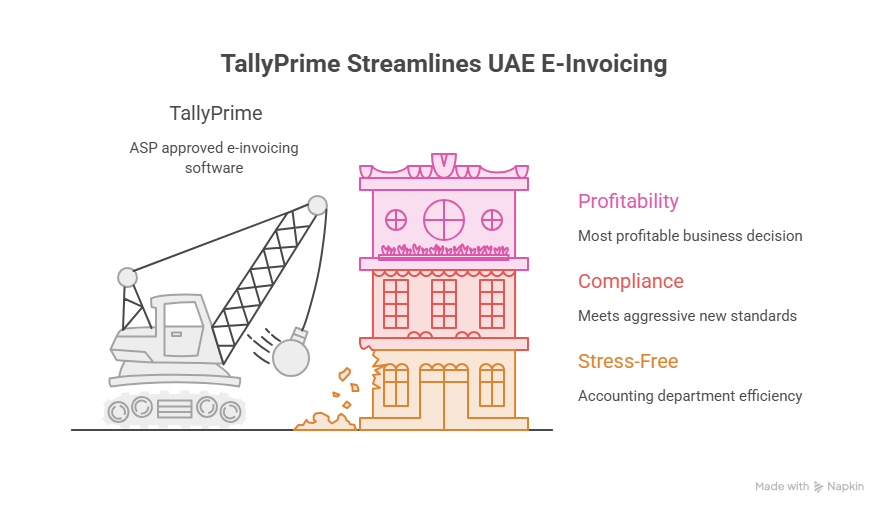
Illustration of a crane constructing a three-layer building labeled Profitability, Compliance, and Stress-Free, highlighting how TallyPrime streamlines UAE e-invoicing and serves as an ASP approved software solution.

The “PINT AE” Reality Check: Why the FTA Mandate Changes Everything

For years, UAE businesses operated with a degree of flexibility in how they generated and stored invoices. The introduction of the UAE E-Billing system fundamentally shifts this paradigm. Built on the Peppol International (PINT) model specifically localized for the Emirates (PINT AE), the FTA’s mandate requires seamless, standardized digital communication between suppliers, buyers, and tax authorities.

What Does PINT AE Compliance Actually Mean for You?

In simple terms, you can no longer just generate a PDF and email it to your client. Your invoices must be generated in a highly specific structured format (XML) that the FTA’s systems can read instantly.

If your current software cannot generate a PINT AE compliant invoice, you effectively cannot do B2B business in the UAE without risking heavy administrative penalties. This is where the panic sets in for many SMEs—and exactly where TallyPrime steps in to eliminate it.
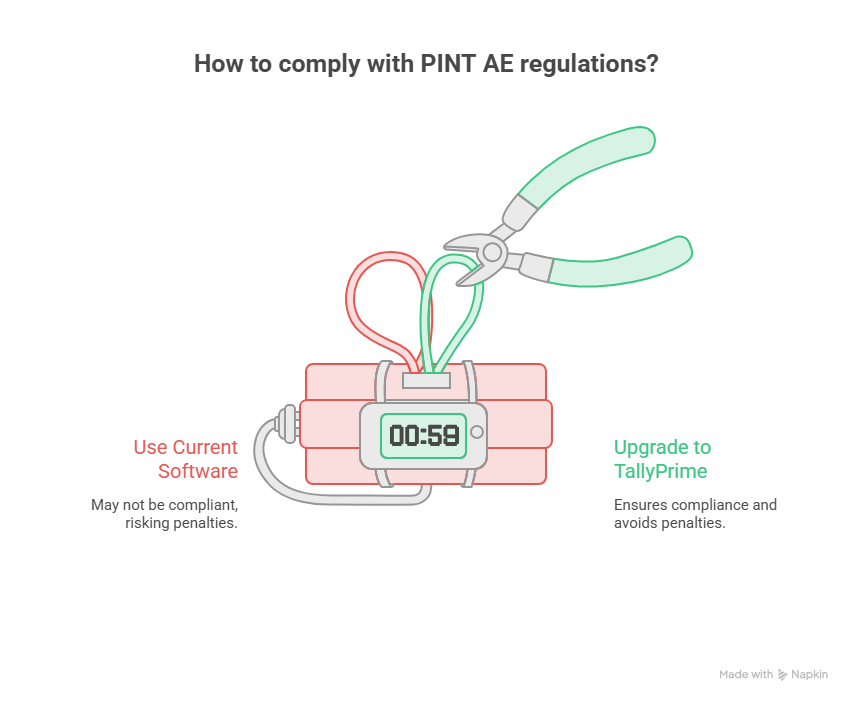
Conceptual infographic showing a ticking clock comparing two choices: using current software which risks penalties, versus upgrading to TallyPrime which ensures compliance with PINT AE regulations and avoids FTA fines.

Enter TallyPrime: The Ultimate ASP Approved Software UAE

When evaluating accounting software in the UAE, the conversation must move beyond basic bookkeeping. You need a system that integrates flawlessly with an Accredited Service Provider (ASP). TallyPrime has positioned itself as the gold standard for UAE businesses because it acts as your silent compliance bodyguard.

1. Seamless UAE E-Invoicing & ASP Integration

TallyPrime is designed to natively support the generation of e-invoices that meet the stringent FTA guidelines. Whether it’s connecting to an ASP to clear your B2B invoices or generating the exact cryptographic stamps and QR codes required for B2C transactions, TallyPrime automates the heavy lifting. Your accountants click “Save,” and TallyPrime ensures the invoice is instantly validated, compliant, and ready for FTA scrutiny.

2. Bulletproof Corporate Tax & VAT Accuracy

The intersection of the 9% UAE Corporate Tax and the standard 5% VAT requires meticulous record-keeping. TallyPrime doesn’t just calculate these figures; it tracks input tax credit, manages reverse charge mechanisms, and flags potential discrepancies before you file your VAT201 return. It maintains the sacred “audit trail” that the FTA demands during corporate tax assessments, ensuring every dirham is accounted for.

3. Bilingual Magic (Arabic/English Compliance)

The FTA heavily favors—and in many cases mandates—Arabic documentation for official tax records and specific retail invoices. TallyPrime offers native, real-time Arabic translation and bilingual invoice generation. You don’t need a third-party plugin; you can generate an invoice in English for your European client and print the Arabic equivalent for your local records simultaneously.

The Cost of Inaction: TallyPrime vs. Manual Excel / Legacy Software

Still thinking about sticking to your old spreadsheet methods or that outdated desktop software? Let’s look at the actual business risks associated with delaying your digital transformation.
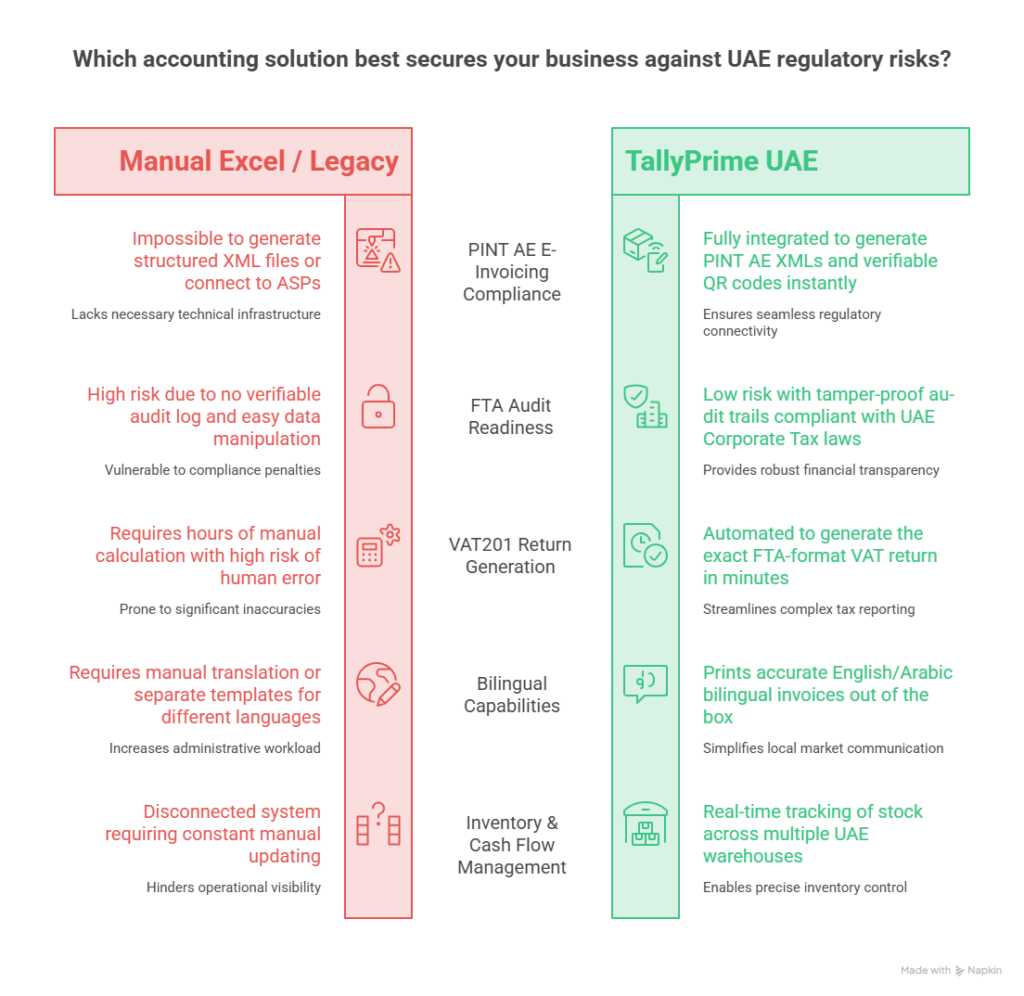
Detailed comparison chart analyzing TallyPrime UAE against Manual Excel and Legacy Software, highlighting key advantages like PINT AE XML generation, tamper-proof audit trails for corporate tax, and automated VAT return preparation.

Beyond Invoicing: How TallyPrime Fuels UAE Business Growth

While PINT AE compliant accounting software is the burning need of the hour, TallyPrime is far more than just a compliance tool. It is a comprehensive business management suite built for the fast-paced GCC market.

Smart Inventory Management for Dubai & Beyond

Whether you are managing retail stock in Deira or a massive logistics warehouse in JAFZA, TallyPrime gives you god-mode visibility over your inventory. It handles multiple godowns (warehouses), batches, expiry dates, and complex manufacturing journals. You know exactly what is selling, what is expiring, and where your capital is tied up.

Cash Flow and Credit Management

In the UAE B2B sector, managing receivables is notoriously challenging. TallyPrime’s robust credit management tools allow you to set credit limits per client, automatically calculate interest on delayed payments, and generate aging analysis reports in seconds. You stop acting as a free bank for your clients and start taking control of your working capital.

Advanced Data Security and User Roles

With data privacy becoming a major focus in the region, TallyPrime ensures your financial data remains secure. You can create highly specific user roles—ensuring your junior accountant can only enter vouchers, while only the CFO can view the final P&L or alter tax configurations.

How to Transition Your UAE Business to TallyPrime

Migrating to new software sounds intimidating, but the transition to TallyPrime is renowned for its simplicity. Here is how local businesses are making the switch seamlessly:

  1. Assess Your Current Data: Export your existing ledgers, closing balances, and inventory masters from your current system.
  2. Consult a Local Tally Partner: Work with a certified UAE Tally partner who understands local tax laws to configure your Chart of Accounts correctly for Corporate Tax.
  3. Data Import: TallyPrime allows for rapid data importing via XML or Excel, meaning you don’t have to start from scratch.
  4. Team Training: Because of its famously intuitive, keyboard-driven interface, most accounting teams become proficient in TallyPrime within a few days.
  5. Go Live & Integrate: Connect TallyPrime to your chosen ASP, run a few test e-invoices, and you are officially compliant and ready to scale.

Don’t Wait for an FTA Penalty to Upgrade

The rollout of the UAE e-invoicing mandate is not a drill, and the window for voluntary compliance is rapidly closing. Relying on outdated systems is no longer just inefficient; it is a direct financial liability.

By adopting TallyPrime UAE e-invoicing now, you aren’t just checking a regulatory box. You are streamlining your operations, safeguarding your cash flow, and giving your team the tools they need to drive growth rather than drowning in paperwork.

Ready to make your business 100% FTA & PINT AE Compliant?

Don’t navigate the UAE E-Invoicing mandate blindly.

👉 [Click Here to Book a Free TallyPrime E-Invoicing Demo] tailored to your specific industry.

TallyPrime software generating a compliant UAE e-invoice on a laptop with the Dubai skyline in the background

UAE E-Invoicing Guide: How to Create E-Invoices in Tally Software 

Is your business ready for the FTA mandate? If you own a business or manage the books in the Emirates, navigating UAE E-Invoicing in Tally is about to become your top priority. 

The Federal Tax Authority (FTA) is rolling out a strict, phased mandate that requires businesses to submit structured, digital invoices. Discover the implementation phases, XML requirements, and a step-by-step guide to generating e-invoices effortlessly.

Let’s be real for a second. If you own a business or manage the books in the UAE, you’ve probably been hearing the term “e-invoicing” bouncing around a lot lately.

Maybe you’ve ignored it, thinking it’s just another minor update you can deal with later.

But here is the deal: E-Invoicing is coming to the UAE, and it is going to fundamentally change how you bill your clients.

If you are still relying on Word documents, Excel sheets, or basic PDFs to send invoices, the clock is ticking. The UAE Federal Tax Authority (FTA) is rolling out a strict, phased e-invoicing mandate that requires businesses to submit highly structured, digital invoices directly to a centralized system.

The good news? If you are using TallyPrime, you are already leaps and bounds ahead of the curve. Tally is officially a Ministry of Finance (MoF) Pre-Approved e-Invoicing Service Provider (ASP), meaning the heavy lifting is practically done for you.

Let’s break down exactly what this mandate means, the urgent deadlines you need to care about, and a step-by-step guide to generating a flawless e-invoice in Tally software.

The UAE E-Invoicing Mandate: Are You in the Crosshairs?

First, let’s clear up a massive misconception. An e-invoice is not just a PDF attached to an email.

Under the new UAE framework, an e-invoice is a highly structured, machine-readable digital file (specifically, an XML format) exchanged securely between the supplier, the buyer, and the tax authority.

Who does this apply to? All taxpayers required to issue invoices under the UAE VAT Law. Currently, the scope covers:

  • B2B (Business-to-Business): Transactions between registered businesses.
  • B2G (Business-to-Government): Transactions where you are supplying a government entity.
  • (Note: B2C – Business-to-Consumer transactions are currently excluded).

The Phased Implementation Timeline (Don’t Wait Until the Last Minute)

The MoF isn’t flipping a switch overnight, but the deadlines are aggressive. The rollout is split into two distinct phases based on your turnover (the gross income earned during your most recent accounting period).

Phase 1: Large Businesses (Revenue > AED 50M)

  • Deadline to Appoint an ASP: 30 October 2026
  • Go-Live Date: 01 January 2027

Phase 2: Other Businesses (Revenue < AED 50M) & Government Entities

  • Deadline to Appoint an ASP: 31 March 2027
  • Go-Live Date: 01 July 2027

💡 Pro Tip: Even if you fall into Phase 2, do not wait until 2027 to modernize your accounting software. The transition takes time, team training, and system testing.

The “XML Nightmare” (And Why Tally is a Lifesaver)

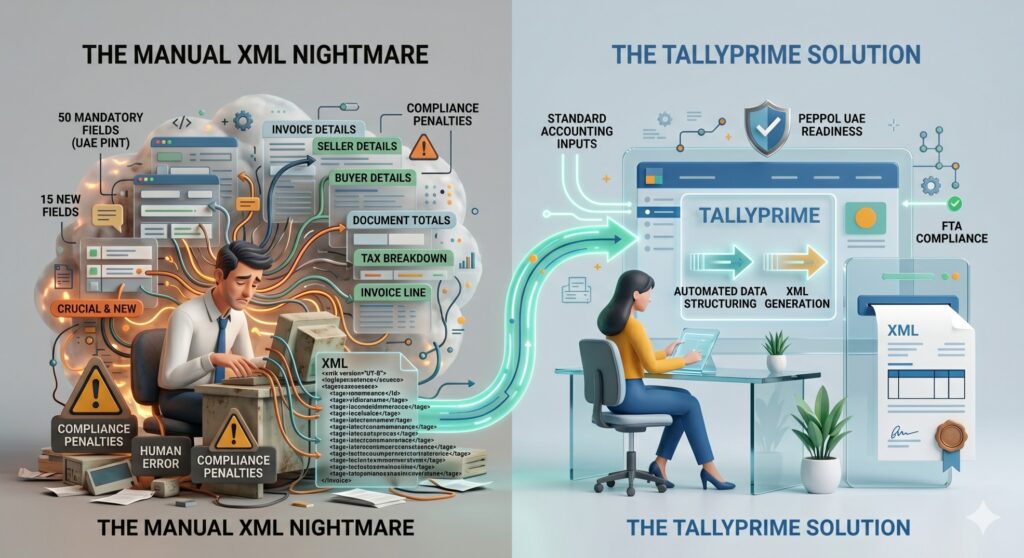
Here is where things get technical. According to the UAE PINT (Peppol International Invoicing model for the UAE), a Standard Tax e-Invoice (XML) requires 50 mandatory fields.

Yes, 50.

This includes 6 comprehensive data sections:

  1. Invoice Details (Invoice type code, currency, payment means)
  2. Seller Details (Legal registration identifier, tax scheme code)
  3. Buyer Details (Buyer electronic address, tax identifier)
  4. Document Totals (Total without tax, amount due)
  5. Tax Breakdown (Tax category rate, taxable amount)
  6. Invoice Line (Item net price, invoiced quantity, VAT line amount)

Crucially, 15 of these highlighted fields are entirely new and are not currently covered under standard UAE VAT Law.

Imagine manually calculating and typing out 50 distinct data points for every single invoice you generate. It’s a recipe for human error, compliance penalties, and absolute accounting burnout.

This is exactly why TallyPrime is essential for UAE FTA compliance. Tally automates this entire data dictionary. It structures your standard accounting inputs into the exact XML format the government demands, complete with PEPPOL UAE readiness.

Why TallyPrime is Your E-Invoicing Lifesaver

This is where TallyPrime e-invoicing steps in to save your sanity. Because Tally Software Solutions FZCO is a pre-approved MoF ASP, the software is natively built to handle the complexities of the UAE framework, including PEPPOL UAE standards.

Using Tally gives you:

  • Zero Manual XML Coding: Tally maps your standard invoice entries directly to the required 50-field structure behind the scenes.
  • 100% VAT Compliance: Built-in checks ensure your TRNs and tax calculations are flawless before the invoice is finalized.
  • Frictionless JSON/XML Generation: Generate the exact file format the government needs with a single click.
  • Secure Record Keeping: Maintains an encrypted, unalterable audit trail of your financial data.

Prerequisites: Getting Your Tally Ready

Before generating UAE E-Invoicing in Tally, you need to lay the groundwork. Make sure you have checked off this list:

  1. Update Tally: Ensure you are running the latest version of TallyPrime.
  2. Internet Access: A stable connection is required for API validations.
  3. TRN Readiness: Your own Tax Registration Number must be updated in your company profile.
  4. Customer Data: You must have the correct TRN and billing details for your B2B clients saved in their respective ledgers.
  5. ASP Readiness: Ensure your integration with the e-invoice portal is active (Tally will guide you through this API connection once the portals are live).

Step-by-Step: How to Create an E-Invoice in Tally

Ready to see how easy it is? Let’s walk through the exact Tally VAT setup and generation process.

Step 1: Enable VAT in Your Company Features

First, we need to tell Tally that your company is subject to UAE VAT.

  1. Go to the Gateway of Tally > F11 Features > Statutory & Taxation.
  2. Set the option Enable Value Added Tax (VAT) to Yes.
  3. Set the option Set/Alter VAT details to Yes.
  4. A new screen will pop up. Here, enter your company’s TRN Number, business details, and specific VAT registration information. Save the screen.

Step 2: Create a Compliant Customer Ledger

Remember those 50 mandatory fields? A lot of them come from your customer’s data. You must set this up correctly once so it auto-populates forever.

  1. Navigate to Gateway of Tally > Accounts Info > Ledgers > Create.
  2. Enter the Customer Name.
  3. Under the tax details section, input their TRN Number.
  4. Fill out their precise Address and Country.
  5. Set the VAT applicability based on the nature of their business.
  6. Save the ledger.

Pro Tip: Do not skip the “Country Subdivision” or “City” fields in the address block. These are part of the new mandatory data points for the XML structure!

Step 3: Configure Your Stock Items

The “Invoice Line” section of the e-invoice requires specific item data.

  1. Go to Gateway of Tally > Inventory Info > Stock Items > Create.
  2. Add the Item name and the Unit of measure (e.g., Nos, Kgs).
  3. Define the VAT rate applicable to this specific item (Standard 5%, Zero-rated, or Exempt).
  4. If your industry requires it, enter the relevant HSN/SAC codes. Save the item.

Step 4: Record the Sales Voucher

Now for the actual billing. You’ll notice this is exactly how you usually do it—Tally handles the heavy lifting in the background.

  1. Go to Gateway of Tally > Vouchers > Sales.
  2. Select the Customer ledger you created in Step 2.
  3. Select your Sales ledger.
  4. Pick the Stock items you are selling, and enter the Quantity and Rate.
  5. Tally will automatically calculate the exact VAT amount based on the item master configurations. Review the totals and save the voucher.

Step 5: Generate the Tax Invoice

  1. After saving, open the invoice voucher.
  2. Press Print (or use the shortcut Alt+P).
  3. Choose the Tax Invoice format.
  4. The generated visual PDF will contain all the necessary human-readable elements: Invoice number, TRN details, comprehensive VAT breakup, customer details, and the final total amount.

Step 6: Generate the e-Invoice JSON/XML (The Final Step)

This is where the magic happens for FTA compliance.

  1. From the completed invoice, use the Export data function.
  2. Tally will package the invoice data into the structured e-invoice JSON Tally format (or XML, depending on portal requirements).
  3. Because Tally is an integrated ASP, this data is pushed to the pre-approved portal/API.
  4. The government system validates the 50 fields, records the transaction, and instantly returns a validation confirmation and a compliant QR Code, which is then stamped onto your final invoice.

Don’t Let Compliance Slow You Down

The shift to mandatory e-invoicing is designed to reduce the tax gap and digitize the UAE economy. While the technical requirements—like perfectly mapping 50 specific data fields—sound intimidating, the reality of execution doesn’t have to be.

By leveraging an MoF-listed pre-approved ASP like Tally Software Solutions, you transform a massive compliance hurdle into a smooth, automated background process. You get to maintain secure digital records, eliminate manual data entry errors, and drastically simplify your VAT filing process at the end of the quarter.

The mandate is on the horizon. Take the time now to update your systems, configure your Tally VAT setup, and get your team comfortable with the workflow. When the FTA deadline hits, you won’t be scrambling—you’ll just be clicking “Generate.”

Make the Transition Seamless with Matrix

The shift to mandatory digital billing doesn’t have to disrupt your operations. Because Tally Software Solutions FZCO is a pre-approved MoF ASP, the software is natively built to handle the complexities of the UAE framework. However, configuring your master data, customer ledgers, and inventory for those 50 mandatory XML fields requires precision.

Don’t leave your FTA compliance to chance. As a trusted Tally Gold Partner, Matrix provides expert implementation, tailored training, and dedicated support to ensure your business is fully prepared for the rollout.

Ready to upgrade your accounting systems? Contact the Tally experts at Matrix today to secure your compliance before the deadline.

Why E-Invoicing is Now a Must for All VAT-Registered Businesses in the UAE

If you’re running a VAT-registered business in the UAE, there’s a big update you can’t afford to ignore: e-invoicing is now mandatory. It’s no longer a matter of “if” but “how soon” you adapt to this change.

So, what’s really going on?

The Federal Tax Authority (FTA) has taken a huge step toward digital transformation by implementing mandatory e-invoicing for VAT-registered businesses. This move is aimed at increasing transparency, improving tax compliance, and reducing fraud across the board.

While some larger companies were already preparing for this, many small and medium-sized businesses are now scrambling to catch up.

Let’s break this down in a way that’s easy to understand—and more importantly, easy to act on.

What Is E-Invoicing and Why Is It Being Enforced?

E-invoicing simply means issuing invoices in a structured electronic format, rather than using paper or PDFs. These e-invoices are automatically sent to and verified by the FTA in real time.

This system is being enforced to help:

  • Streamline VAT reporting
  • Prevent tax evasion
  • Improve accuracy and efficiency

With the UAE e-invoicing regulation now in full effect, every business registered under VAT must comply whether you’re in retail, services, or e-commerce.

Who Is Affected by Mandatory E-Invoicing?

In short: every VAT-registered business.

Whether you’re a freelancer issuing invoices or a company with thousands of transactions per day, compliance with UAE e-invoicing rules is now mandatory. Non-compliance can lead to hefty penalties, late filing fees, and legal issues.

What You Need to Do Now

If you haven’t already, switch to an FTA-compliant e-invoicing system. Here are a few steps you should take right away:

  1. Understand the technical requirements: Your invoicing software must be able to generate XML or other FTA-approved formats.
  2. Integrate your systems: Ensure your accounting or ERP solution is compatible with the e-invoicing mandate.
  3. Train your staff: Everyone involved in sales or finance should understand how the new system works.
  4. Test your process: Run some pilot e-invoices and ensure they are accepted by the FTA.

Challenges Businesses Are Facing

A major concern for small and medium-sized enterprises (SMEs) is technical readiness. Many lack the tools or knowledge to make the transition quickly.

Others worry about data security, software costs, or the confusion around what’s actually required. These are valid concerns—but staying ahead of the curve can save you time, money, and stress down the line.


The Bottom Line: Don’t Wait Until It’s Too Late

Mandatory e-invoicing for VAT-registered businesses in the UAE isn’t just another compliance requirement—it’s a sign of the future. The sooner you embrace it, the smoother your operations and VAT reporting will become.

If you’re feeling overwhelmed, talk to a tax technology expert or explore software providers who specialize in FTA-compliant e-invoicing solutions.