

3D visualization of the TallyPrime 7.0 business ecosystem dashboard, highlighting TallyDrive secure cloud storage, data protection, and connected banking with UAE bank partners.

Demystifying TallyPrime 7.0: TallyDrive, Connected Banking, and Taking Your Business Fully Digital

If you’re running a business in the UAE or the wider Middle East, you already know that the pace of commerce here is incredibly fast. Whether you are managing trading operations in Dubai, a manufacturing unit in Sharjah, or cross-border logistics across the GCC, staying on top of your financial data isn’t just about compliance anymore—it’s about survival and speed.

With the recent launch of Release 7.0, the landscape of business management software has taken a massive leap forward. Existing users are eagerly searching to understand how to leverage the TallyPrime 7.0 new features, while prospective users are actively hunting for modern, cloud-enabled accounting solutions that don’t compromise on reliability.

If you’ve been wondering how to take your business operations fully digital without losing control of your data, you’re in the right place. In this comprehensive guide, we are demystifying the biggest game-changers in Release 7.0: TallyDrive and Connected Banking.

The GCC Business Landscape: Why TallyPrime 7.0 Matters Now

Before diving into the heavy-hitting features, it’s worth noting that TallyPrime 7.0 feels custom-built for the Middle Eastern market. Moving away from manual, paper-heavy processes is a core initiative for governments across the UAE and KSA.

Release 7.0 bridges the gap between traditional bookkeeping and modern digital operations by introducing highly localized features. You now get native support for official currency symbols—simply hit Ctrl+Shift+6 for the UAE Dirham (AED) and Ctrl+Shift+7 for the Saudi Riyal (SAR). Furthermore, the release enhances dual-language (Arabic and English) invoicing and ensures your VAT returns remain flawlessly compliant with the latest FTA and ZATCA regulations.

But the real magic of this update lies in how it protects your hard work and automates the most tedious parts of your week.

TallyDrive: Bulletproofing Your Business with Cloud Backups

Let’s talk about a business owner’s worst nightmare: the sudden blue screen of death, a corrupted hard drive, or a ransomware attack. If your accounting data lives solely on a single physical machine in your office, you are operating with a single point of failure.

A desktop computer utilizing TallyDrive for automated daily sync and secure cloud storage in TallyPrime 7.0.

Historically, businesses managed this by setting manual reminders to copy data to an external hard drive every Friday evening. But human error is inevitable; we forget, we get busy, or the external drive gets misplaced.

Enter TallyDrive cloud backup.

Think of TallyDrive as an invisible, highly disciplined safety net for your business. Release 7.0 introduces “Auto Backup 2.0,” which completely eliminates the manual effort of securing your data. Here is why it’s completely changing the way SMEs operate:

1. Set It and Forget It

Once you configure your backup rules in TallyPrime 7.0, the software does the rest. You can schedule backups to run daily, weekly, or monthly. The best part? The backup schedule executes flawlessly in the background, even if the TallyPrime application is closed, as long as your system is turned on.

2. Smart, Space-Saving Incremental Backups

You might be wondering, “If it backs up every day, won’t I run out of cloud space instantly?” TallyDrive uses an intelligent incremental backup system. It takes a full backup initially, but on subsequent days, it only backs up the changes made since the last session. This dramatically reduces the time it takes to backup and optimizes your cloud storage limit (which is included free with your active TSS subscription).

3. Fort Knox-Level Security

When you move to the cloud, security is the immediate next question. Keeping secure accounting data on cloud is a priority for Tally. All data backed up to TallyDrive is protected by your TallyVault password and requires authorized Tally.NET IDs to access. If a local system crashes, you simply log in from a new machine, select the exact version of the backup you want to restore, and you are back to business in minutes.

TallyDrive isn’t just a storage folder; it is a dedicated business continuity plan.

Connected Banking 2.0: The End of Manual Payment Tracking

If data loss is a business owner’s worst nightmare, then bank reconciliation is their most dreaded weekend chore.

Picture this: It’s the end of the month. You have Tally open on your left monitor and your corporate bank portal open on the right. You are squinting at transaction IDs, matching manual vendor payments to ledger entries, tracking down unrecorded bank charges, and hoping the closing balances match. It is a slow, painful, and error-prone process.

TallyPrime connected banking is here to end this dance forever. By directly integrating with major banks, TallyPrime 7.0 brings your banking interface inside your accounting software.

1. Real-Time Bank Balances and Instant Statements

You no longer need to juggle multiple login IDs, OTPs, and passwords just to check if a client’s payment has cleared. Connected Banking allows you to view your live bank balances and fetch up-to-date bank statements instantly, directly within the Tally interface.

2. Direct, Seamless Payments

Imagine approving a purchase invoice in Tally and instantly generating the payment to your supplier from the exact same screen. With PrimeBanking, you can initiate online payments directly. The system automatically updates the transaction status (Pending, Processed, or Rejected) and generates automated payment advice (via email or SMS) to keep your suppliers in the loop.

3. Auto-Reconciliation that Feels Like Magic

Because the bank data flows directly into TallyPrime, reconciliation becomes a breeze. The software intelligently auto-matches bank statement entries against your company books. It skips duplicate entries, flags mismatches, and even updates missing details like dates and narrations based on the real-time banking data. What used to take hours of manual checking can now be finalized in a matter of clicks.

The Bonus Features: SmartFind and JSON Integration

While TallyDrive and Connected Banking are the headline acts, Release 7.0 brings a few more tricks to the table for the modern, digital business.

  • SmartFind (Fuzzy Search): We’ve all forgotten the exact spelling of a vendor’s name or a specific stock item. The new SmartFind feature works like a powerful search engine across all your loaded companies. Even if you misspell a word, its intuitive fuzzy logic will locate the ledger, voucher, or transaction you are looking for instantly.
  • JSON Import & Export: For businesses looking to build a fully integrated digital ecosystem, TallyPrime 7.0 now natively supports JSON data exchange. This makes integrating Tally with your e-commerce platforms, custom CRM systems, or third-party web apps smoother, faster, and more reliable than ever before.

The Verdict: Is It Time to Make the Move?

The business world is unforgiving to those who refuse to adapt. Clinging to manual backups and disjointed banking processes is costing you precious time, risking your data, and tying up resources that should be focused on growth.

The TallyPrime 7.0 new features represent a fundamental shift in how accounting software should work. By securing your data effortlessly with TallyDrive and automating your cash flow management with Connected Banking, you are not just upgrading your software—you are upgrading your entire operational workflow.
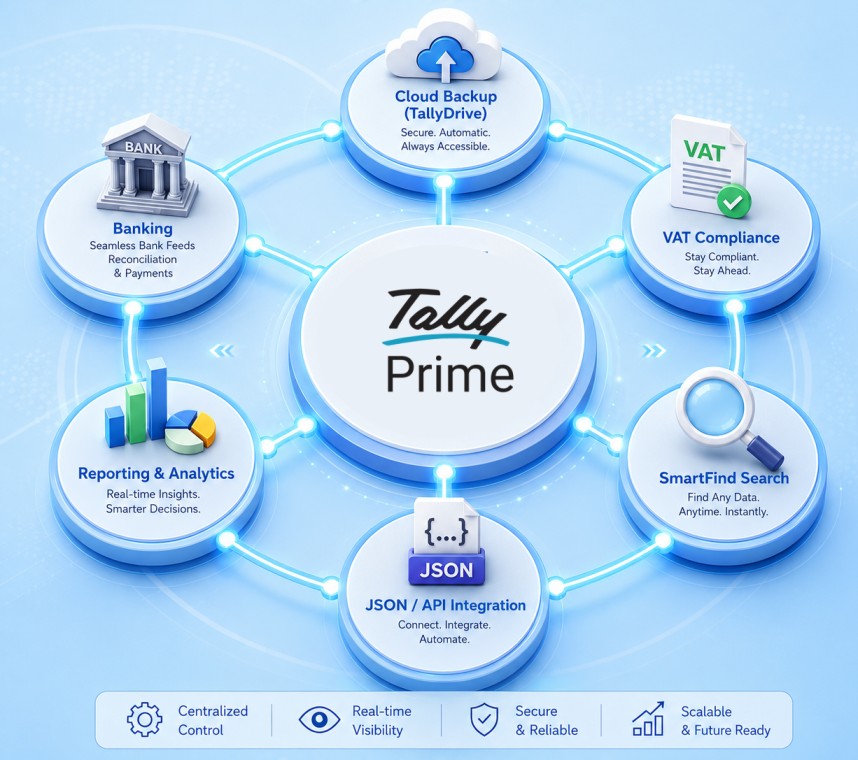
Circular infographic illustrating TallyPrime 7.0 core features, including TallyDrive cloud backup, connected banking feeds, VAT compliance, reporting, JSON API integration, and SmartFind search.

Are you an existing user? Ensure your TSS (Tally Software Services) is active to download Release 7.0 today and instantly unlock your free TallyDrive cloud storage.

New to Tally? There has never been a better time to digitize your business. Experience the peace of mind that comes with automated cloud backups and intelligent banking. Welcome to the future of business management in the Middle East.

As a trusted Tally Gold Partner, Matrix Technologies Trading LLC specializes in helping businesses across the UAE seamlessly transition to TallyPrime 7.0 without a single minute of downtime.

[Schedule Your Free TallyPrime 7.0 Readiness Consultation Today]

TallyPrime software generating a compliant UAE e-invoice on a laptop with the Dubai skyline in the background

UAE E-Invoicing Guide: How to Create E-Invoices in Tally Software 

Is your business ready for the FTA mandate? If you own a business or manage the books in the Emirates, navigating UAE E-Invoicing in Tally is about to become your top priority. 

The Federal Tax Authority (FTA) is rolling out a strict, phased mandate that requires businesses to submit structured, digital invoices. Discover the implementation phases, XML requirements, and a step-by-step guide to generating e-invoices effortlessly.

Let’s be real for a second. If you own a business or manage the books in the UAE, you’ve probably been hearing the term “e-invoicing” bouncing around a lot lately.

Maybe you’ve ignored it, thinking it’s just another minor update you can deal with later.

But here is the deal: E-Invoicing is coming to the UAE, and it is going to fundamentally change how you bill your clients.

If you are still relying on Word documents, Excel sheets, or basic PDFs to send invoices, the clock is ticking. The UAE Federal Tax Authority (FTA) is rolling out a strict, phased e-invoicing mandate that requires businesses to submit highly structured, digital invoices directly to a centralized system.

The good news? If you are using TallyPrime, you are already leaps and bounds ahead of the curve. Tally is officially a Ministry of Finance (MoF) Pre-Approved e-Invoicing Service Provider (ASP), meaning the heavy lifting is practically done for you.

Let’s break down exactly what this mandate means, the urgent deadlines you need to care about, and a step-by-step guide to generating a flawless e-invoice in Tally software.

The UAE E-Invoicing Mandate: Are You in the Crosshairs?

First, let’s clear up a massive misconception. An e-invoice is not just a PDF attached to an email.

Under the new UAE framework, an e-invoice is a highly structured, machine-readable digital file (specifically, an XML format) exchanged securely between the supplier, the buyer, and the tax authority.

Who does this apply to? All taxpayers required to issue invoices under the UAE VAT Law. Currently, the scope covers:

  • B2B (Business-to-Business): Transactions between registered businesses.
  • B2G (Business-to-Government): Transactions where you are supplying a government entity.
  • (Note: B2C – Business-to-Consumer transactions are currently excluded).

The Phased Implementation Timeline (Don’t Wait Until the Last Minute)

The MoF isn’t flipping a switch overnight, but the deadlines are aggressive. The rollout is split into two distinct phases based on your turnover (the gross income earned during your most recent accounting period).

Phase 1: Large Businesses (Revenue > AED 50M)

  • Deadline to Appoint an ASP: 30 October 2026
  • Go-Live Date: 01 January 2027

Phase 2: Other Businesses (Revenue < AED 50M) & Government Entities

  • Deadline to Appoint an ASP: 31 March 2027
  • Go-Live Date: 01 July 2027

💡 Pro Tip: Even if you fall into Phase 2, do not wait until 2027 to modernize your accounting software. The transition takes time, team training, and system testing.

The “XML Nightmare” (And Why Tally is a Lifesaver)

Here is where things get technical. According to the UAE PINT (Peppol International Invoicing model for the UAE), a Standard Tax e-Invoice (XML) requires 50 mandatory fields.

Yes, 50.

This includes 6 comprehensive data sections:

  1. Invoice Details (Invoice type code, currency, payment means)
  2. Seller Details (Legal registration identifier, tax scheme code)
  3. Buyer Details (Buyer electronic address, tax identifier)
  4. Document Totals (Total without tax, amount due)
  5. Tax Breakdown (Tax category rate, taxable amount)
  6. Invoice Line (Item net price, invoiced quantity, VAT line amount)

Crucially, 15 of these highlighted fields are entirely new and are not currently covered under standard UAE VAT Law.

Imagine manually calculating and typing out 50 distinct data points for every single invoice you generate. It’s a recipe for human error, compliance penalties, and absolute accounting burnout.

This is exactly why TallyPrime is essential for UAE FTA compliance. Tally automates this entire data dictionary. It structures your standard accounting inputs into the exact XML format the government demands, complete with PEPPOL UAE readiness.

Why TallyPrime is Your E-Invoicing Lifesaver

This is where TallyPrime e-invoicing steps in to save your sanity. Because Tally Software Solutions FZCO is a pre-approved MoF ASP, the software is natively built to handle the complexities of the UAE framework, including PEPPOL UAE standards.

Using Tally gives you:

  • Zero Manual XML Coding: Tally maps your standard invoice entries directly to the required 50-field structure behind the scenes.
  • 100% VAT Compliance: Built-in checks ensure your TRNs and tax calculations are flawless before the invoice is finalized.
  • Frictionless JSON/XML Generation: Generate the exact file format the government needs with a single click.
  • Secure Record Keeping: Maintains an encrypted, unalterable audit trail of your financial data.

Prerequisites: Getting Your Tally Ready

Before generating UAE E-Invoicing in Tally, you need to lay the groundwork. Make sure you have checked off this list:

  1. Update Tally: Ensure you are running the latest version of TallyPrime.
  2. Internet Access: A stable connection is required for API validations.
  3. TRN Readiness: Your own Tax Registration Number must be updated in your company profile.
  4. Customer Data: You must have the correct TRN and billing details for your B2B clients saved in their respective ledgers.
  5. ASP Readiness: Ensure your integration with the e-invoice portal is active (Tally will guide you through this API connection once the portals are live).

Step-by-Step: How to Create an E-Invoice in Tally

Ready to see how easy it is? Let’s walk through the exact Tally VAT setup and generation process.

Step 1: Enable VAT in Your Company Features

First, we need to tell Tally that your company is subject to UAE VAT.

  1. Go to the Gateway of Tally > F11 Features > Statutory & Taxation.
  2. Set the option Enable Value Added Tax (VAT) to Yes.
  3. Set the option Set/Alter VAT details to Yes.
  4. A new screen will pop up. Here, enter your company’s TRN Number, business details, and specific VAT registration information. Save the screen.

Step 2: Create a Compliant Customer Ledger

Remember those 50 mandatory fields? A lot of them come from your customer’s data. You must set this up correctly once so it auto-populates forever.

  1. Navigate to Gateway of Tally > Accounts Info > Ledgers > Create.
  2. Enter the Customer Name.
  3. Under the tax details section, input their TRN Number.
  4. Fill out their precise Address and Country.
  5. Set the VAT applicability based on the nature of their business.
  6. Save the ledger.

Pro Tip: Do not skip the “Country Subdivision” or “City” fields in the address block. These are part of the new mandatory data points for the XML structure!

Step 3: Configure Your Stock Items

The “Invoice Line” section of the e-invoice requires specific item data.

  1. Go to Gateway of Tally > Inventory Info > Stock Items > Create.
  2. Add the Item name and the Unit of measure (e.g., Nos, Kgs).
  3. Define the VAT rate applicable to this specific item (Standard 5%, Zero-rated, or Exempt).
  4. If your industry requires it, enter the relevant HSN/SAC codes. Save the item.

Step 4: Record the Sales Voucher

Now for the actual billing. You’ll notice this is exactly how you usually do it—Tally handles the heavy lifting in the background.

  1. Go to Gateway of Tally > Vouchers > Sales.
  2. Select the Customer ledger you created in Step 2.
  3. Select your Sales ledger.
  4. Pick the Stock items you are selling, and enter the Quantity and Rate.
  5. Tally will automatically calculate the exact VAT amount based on the item master configurations. Review the totals and save the voucher.

Step 5: Generate the Tax Invoice

  1. After saving, open the invoice voucher.
  2. Press Print (or use the shortcut Alt+P).
  3. Choose the Tax Invoice format.
  4. The generated visual PDF will contain all the necessary human-readable elements: Invoice number, TRN details, comprehensive VAT breakup, customer details, and the final total amount.

Step 6: Generate the e-Invoice JSON/XML (The Final Step)

This is where the magic happens for FTA compliance.

  1. From the completed invoice, use the Export data function.
  2. Tally will package the invoice data into the structured e-invoice JSON Tally format (or XML, depending on portal requirements).
  3. Because Tally is an integrated ASP, this data is pushed to the pre-approved portal/API.
  4. The government system validates the 50 fields, records the transaction, and instantly returns a validation confirmation and a compliant QR Code, which is then stamped onto your final invoice.

Don’t Let Compliance Slow You Down

The shift to mandatory e-invoicing is designed to reduce the tax gap and digitize the UAE economy. While the technical requirements—like perfectly mapping 50 specific data fields—sound intimidating, the reality of execution doesn’t have to be.

By leveraging an MoF-listed pre-approved ASP like Tally Software Solutions, you transform a massive compliance hurdle into a smooth, automated background process. You get to maintain secure digital records, eliminate manual data entry errors, and drastically simplify your VAT filing process at the end of the quarter.

The mandate is on the horizon. Take the time now to update your systems, configure your Tally VAT setup, and get your team comfortable with the workflow. When the FTA deadline hits, you won’t be scrambling—you’ll just be clicking “Generate.”

Make the Transition Seamless with Matrix

The shift to mandatory digital billing doesn’t have to disrupt your operations. Because Tally Software Solutions FZCO is a pre-approved MoF ASP, the software is natively built to handle the complexities of the UAE framework. However, configuring your master data, customer ledgers, and inventory for those 50 mandatory XML fields requires precision.

Don’t leave your FTA compliance to chance. As a trusted Tally Gold Partner, Matrix provides expert implementation, tailored training, and dedicated support to ensure your business is fully prepared for the rollout.

Ready to upgrade your accounting systems? Contact the Tally experts at Matrix today to secure your compliance before the deadline.

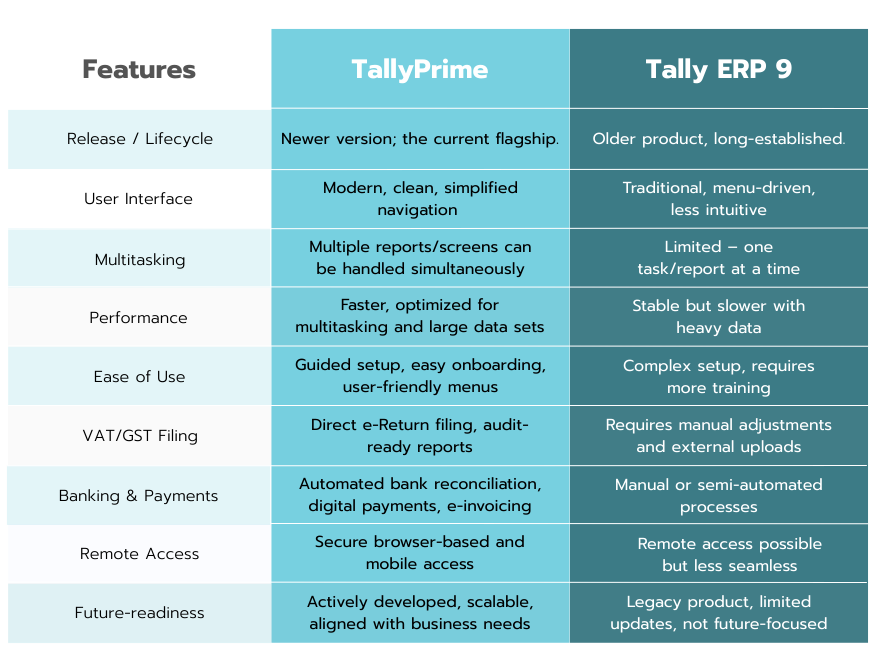
Tallyprime vs tally ERP 9

TallyPrime vs. Tally ERP 9: Your Ultimate Guide for Choosing the Best in 2026

For many years, Tally has been the go-to name for accounting and business management. Whether you’re a small shop owner or a big company, millions of people have relied on Tally to keep their financial records in order. Tally ERP 9 was the backbone of this trust, known for being a reliable and dependable tool that always got the job done.

In 2026, when businesses operate under high pressure due to rapid changes, they need systems that can handle efficiency, automation, and remote work efficiently. Does the old system still hold up?

TallySolutions introduced TallyPrime, a new software that revolutionizes business operations.

This isn’t just a simple update, it’s a complete transformation.

As you get ready for next year’s finances, you may wonder: Which option suits your company best? Let’s take a close look at both options to help you make the right decision.

Tally ERP 9: The Legacy of Trust

Before we decide on a winner, we need to give credit where it’s due.

Tally ERP 9 was, and in many ways still is, a remarkable piece of software. It brought enterprise-level planning to small and medium-sized businesses by making complex tasks easier.

Some of the core features included:

  • Robust Financial Management: ERP 9 provided a comprehensive set of features, ranging from budgeting and multi-currency to ledgers and accounts payable.
  • Integrated Inventory Control: Inventory management was made possible by batch-wise tracking, numerous godowns, and stock groups.
  • Reliable Compliance: Companies found it easier to comply with legal requirements, such as properly processing payroll and paying taxes.
  • Simple Interface: Quick navigation through menus and efficient use of keyboards, enabled skilled individuals to operate effectively.

However, the simplicity that made it popular also had its downsides.

The old-style interface and missing modern functions such as real-time multitasking and cloud connectivity made it hard for this software to be useful in today’s busy work world where people want more from their programs.

TallyPrime: The Future of Business Management

TallyPrime isn’t merely an updated version of ERP 9; it’s a reimagined experience.

It retains the core features of Tally ERP 9 but adds modern, user-friendly tools designed for today’s business world. The main advantage is that TallyPrime helps you save time by automating repetitive tasks, allowing you to focus on growing your business.

1. Unmatched User Experience & Navigation

A Modern Look for a Modern Business: The sleek, easy-to-read interface and signature blue theme are a welcome change from the old green screen. The clean design helps reduce visual clutter, allowing you to focus on your data without distractions.

The “Go To” Power: Imagine a search bar that applies to the entire company. By entering a few keywords, you may quickly locate any report, voucher, or setting using the “Go To” tool. Every operation will be effortless since you won’t have to memorize complicated keys or navigation paths to.

Smooth Multitasking: You can work on multiple tasks at once in a single window using TallyPrime. It’s simple to put an invoice on hold, review a crucial report, and then resume your work precisely where you left off without losing any work. In terms of everyday productivity, this is a game-changer for daily productivity.

Analyze Faster, Plan Smarter: The ability to save a particular view of a report is a huge time-saver. Once you’ve filtered and customized a report to your needs, you can save that specific view for quick, one-click access in the future, allowing for faster recurring analysis and better decision-making.

2. Banking and Automation Built for Efficiency

Manual data entry for banking is not only time-consuming but also prone to errors. TallyPrime introduces powerful automation that streamlines your banking processes in the UAE:

  • Automated Accounting: Bank statements may now be imported straight into TallyPrime, which will create the appropriate vouchers for payments and receipts.
  • Smarter Reconciliation: The one-click auto-reconciliation feature is a massive time saver. It automatically matches transactions and even provides smart suggestions for unmatched entries.
  • Connected Banking: This feature gives you a clear picture of your cash flow by allowing you to monitor live bank balances and real-time updates for partner banks without ever leaving the app.

3. Seamless Compliance and Multilingual Support

Compliance is a must for companies operating in the United Arab Emirates. In this sense, TallyPrime is made to be your reliable partner. It provides a range of advanced features that go beyond basic tax computations, giving you the assurance that your company is constantly operating in full compliance with local tax regulations.

You can easily manage your whole VAT cycle from beginning to end with TallyPrime’s Connected VAT e-Return feature. Everything can be handled straight from TallyPrime, including:

  • Generating VAT-compliant invoices that meet all local requirements.
  • Preparing and filing VAT returns with a single click.
  • Submitting returns straight from your accounting program to the FTA portal.
  • Tracking the status of your returns and even accessing refund details within TallyPrime itself.

The built-in Edit Log feature provides a powerful audit trail, recording every change made to a voucher or master. This feature ensures total transparency and helps you stay audit-ready.

Furthermore, TallyPrime ensures you can communicate professionally with all your clients, regardless of their native language. It offers robust multilingual capability, allowing you to create and print bilingual invoices in English and Arabic that are fully compliant with local regulations.

Learn more about TallyPrime’s features on their official site here

Migration Realities — What You Must Know

There are always concerns regarding effort and safety while upgrading to new software. Although Tally simplifies migration, there are still important things to think about before making the switch.

Migration Essentials

The migration is smooth but one-way: ERP 9 cannot open the same data after switching to TallyPrime. Always make sure to back up your data before starting.

Tally offers tools and guides to help with migration. Most businesses switch without any major issues.

Before going live, you should test the migrated data by running trial balances, GST reports, and reconciliation statements.

Customizations: If you’re using TDLs in ERP 9, make sure to check with your partner to ensure they can be moved over to TallyPrime.

Migration Checklist

  1. Back up your ERP 9 data.
  2. Install TallyPrime on a test computer.
  3. Run the migration tool.
  4. Check reports and compliance.
  5. Train users on the “Go To” feature and how to navigate using multitasking.

The Verdict: Is It Time to Upgrade?

In 2026, the business world is moving fast, and there’s little room for inefficiency.

Though ERP 9 is still reliable, most businesses will find that TallyPrime offers faster performance, better compliance, and more flexibility to support growth.

Why Upgrade to TallyPrime

  • Save time: Multitasking and “Go To” save hours each week.
  • Go digital: Workflows are streamlined by remote access and banking automation.
  • Stay compliant: With features like VAT e-Return and Edit Log, it is audit-ready and constantly updated with tax changes.

While Tally ERP 9 is still reliable for older systems with many customizations, it’s not ready for the future.

If your goals are growth, efficiency, and compliance, TallyPrime is the better choice.

Final Word

In 2026, the decision isn’t just about choosing between old and new software.

It’s about choosing between staying functional or growing smarter. TallyPrime isn’t here to replace what worked, it’s here to take it even further.

For businesses that want to thrive, not just survive, the future is TallyPrime.

Ready to move beyond ERP 9? Our team can help you transition smoothly. Book a free consultation with our experts.

How to file Vat returns in UAE

How to file VAT Returns in UAE using TallyPrime

After the introduction of VAT in 2018, businesses in the UAE are required by law to maintain precise records and file VAT returns to the Federal Tax Authority (FTA). For many companies, this process appears complex. Especially when managing different invoices, expenses, and changes to track.

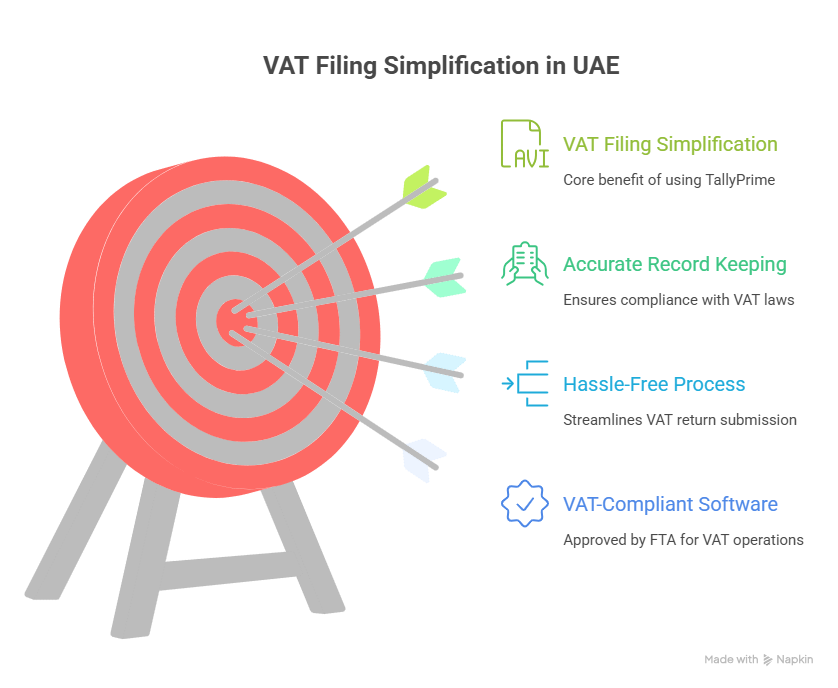
That’s where TallyPrime comes into play. TallyPrime, approved by FTA as VAT-compliant software, streamlines VAT return filing, guaranteeing accuracy and ease. This guide will detail exactly how VAT filing works in the UAE using TallyPrime.

Step 1: Confirm VAT Is Activated in TallyPrime

VAT needs to be set up in your company settings prior to generating returns.

  1. Open you company in TallyPrime.
  2. Navigate to F11: Features > Statutory & Tax.
  3. Activate VAT and provide your TRN (Tax Registration Number).
  4. Select UAE VAT as your taxation method.
  5. Establish tax rates according to your business category (5%, 0%, or tax-exempt).

After completion, TallyPrime will automatically apply VAT to every invoice, purchase, and credit note.

Step 2: Accurately Document All Transactions

VAT returns depend on accurate data input. In TallyPrime, you can:

  • Generate sales invoices that comply with VAT requirements, including customer TRN, invoice number, and VAT details.
  • Record purchase invoices along with supplier TRN and reclaim input VAT.
  • Accurately record zero-rated and exempt supplies.
  • Manage reverse charge transactions where applicable.

Pro Tip: Consistently verify entries with FTA standards to prevent inconsistencies.

Step 3: Create the VAT Tax Calculation Report

After transactions are recorded, TallyPrime automatically generates a VAT Computation Report, detailing:

  • Output VAT (gathered from sales).
  • Input VAT (paid on acquisitions).
  • Changes such as reverse billing.
  • Total VAT owed or to be reimbursed.

To view it:

  1. Go to Gateway of Tally > Display More Reports > Statutory Reports > VAT Reports.
  2. Select VAT Return.
  3. Review the summary carefully.
  4. This gives you a complete picture of your tax position before filing.

Step 4: Export VAT Return in FTA Format

The FTA mandates that VAT returns must be filed in their designated format. TallyPrime is created to produce this automatically.

  1. On the VAT Return screen, select Export.
  2. Select the FTA format (Excel or XML as needed).
  3. Store the document on your device.

Your VAT return is now prepared for direct upload to the FTA e-Services portal.

Step 5: Submit VAT Return on the FTA Portal

  1. Access the FTA e-Services Portal by logging in at https://eservices.tax.gov.ae.
  2. Submit the return file created by TallyPrime.
  3. Review the summary of returns thoroughly.
  4. File the return and pay any outstanding VAT.

That’s it. your VAT return has been submitted accurately and on time.

Why Use TallyPrime for VAT Filing?

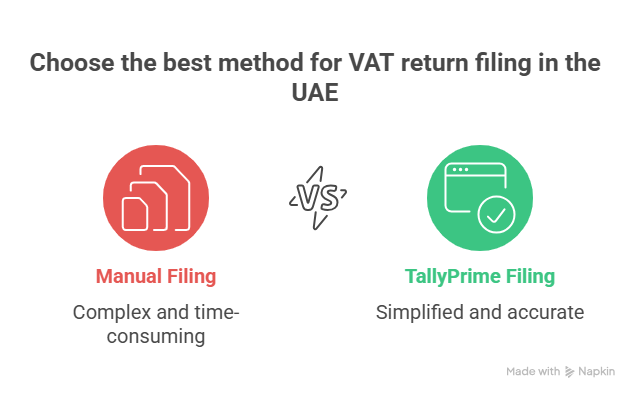
Many businesses still try to manage VAT manually, but this increases the risk of errors and penalties. With TallyPrime, you benefit from:

  • FTA-approved structure – Returns generated precisely as required by law.
  • Accuracy – Automated VAT computation reduces human error.
  • Time efficiency – finishing paperwork in minutes rather than hours.
  • End-to-end compliance – All aspects are addressed, from invoicing to reporting.
  • Scalability – Suitable for startups, medium-sized companies, and major corporations.

Final Words:

Submitting VAT returns in the UAE can be stress-free. Using TallyPrime + TSS allows you to maintain compliance, save time, and prevent expensive errors.
If you’re still submitting VAT by hand or relying on old software, it’s time to make a change. TallyPrime keeps your business prepared for the upcoming return cycle—precise, compliant, and effortless.
Renew your Tally Software Services (TSS) regularly to keep your software updated with the latest VAT formats and FTA requirements.

Business Tip: Always verify your VAT reports in TallyPrime prior to exporting. A brief assessment today prevents FTA questions later.

Get in touch!

Matrix Technologies – Authorized Tally Partner in UAE
📍 Dubai, UAE
📧 Email: sales@tallyprimeerpsoftware.com
📱 Call/WhatsApp: +971-54-586-3379
🌐 Website: www.tallyprimeerpsoftware.com

Stay compliant and stress-free—renew your Tally Software Services (TSS) today and let TallyPrime handle your VAT returns effortlessly!

Why Renew Tally Software Services (TSS) Every Year?

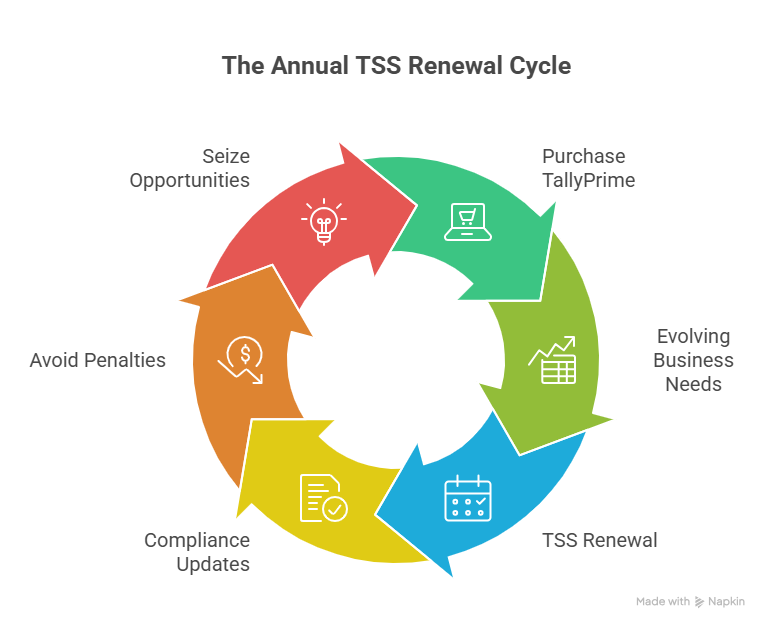
When you first buy TallyPrime, it feels like you’ve got everything you need—smooth accounting, invoicing, inventory, and compliance tools right at your fingertips. But here’s the truth: business and compliance needs are constantly evolving. That’s exactly why Tally Software Services (TSS) exists, and why renewing it every year is not just a formality—it’s an investment that saves you from headaches, penalties, and missed opportunities.

In this blog, let’s break down in simple terms why renewing TSS should always be on your business checklist.

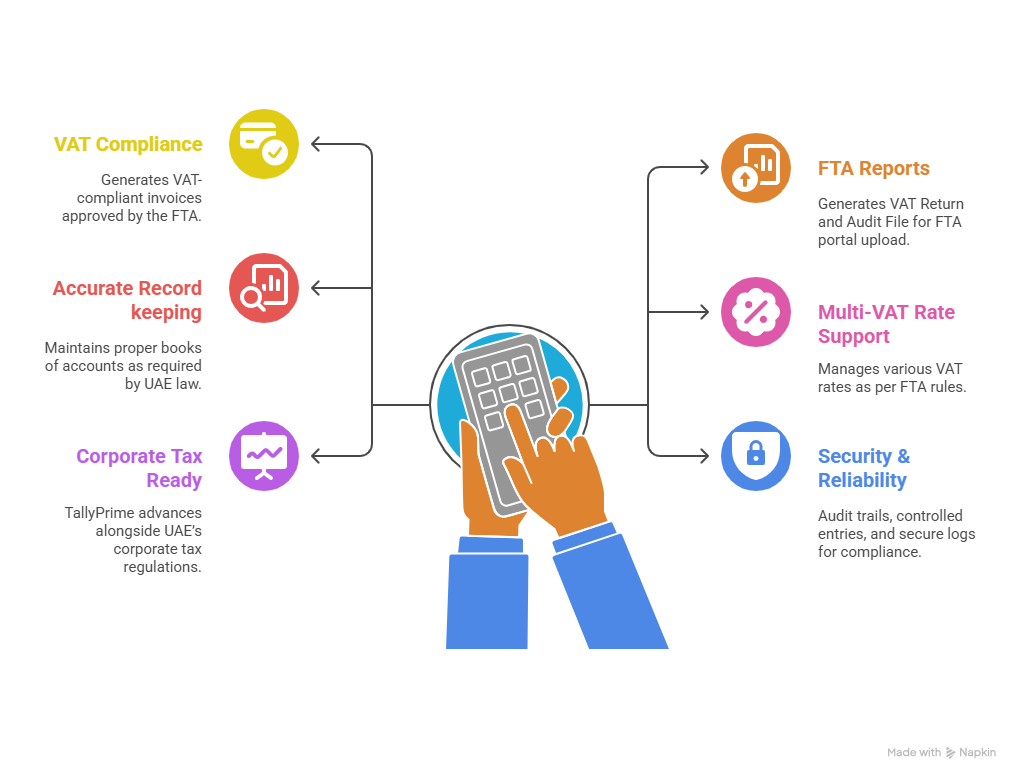
Stay 100% Statutory Compliant (VAT & Corporate Tax)

UAE businesses today are not only bound by VAT laws but also by corporate tax requirements and other statutory rules. With TSS, your TallyPrime keeps pace with all the latest statutory updates.

Here’s how TallyPrime guarantees your compliance:

  • VAT Compliance: Tally creates VAT-compliant invoices (Tax Invoice, Simplified Invoice, Credit Note, Debit Note) that have been authorized by the FTA.
  • FTA Reports: Produces audit files (FAF/XML) and VAT returns (Form 201) that may be uploaded straight to the FTA portal.
  • Accurate Record Keeping: As mandated by UAE legislation, maintains appropriate books of accounts. guarantees accurate VAT calculation (input, output, and modifications).
  • Support for Multi-VAT Rates: Handles 5%, zero-rated, exempt, and out-of-scope transactions in accordance with FTA regulations.
  • Corporate Tax Ready: TallyPrime ensures that you remain in compliance with legal requirements by continuously improving alongside the UAE’s corporate tax regulations

Consider TSS as your statutory compliance insurance—constantly ensuring you adhere to the most recent regulations.

Get Access to New Features & Upgrades

Tally isn’t static. Every few months, updates and enhancements are launched, including improved reports, quicker operations, and simpler navigation.

Some benefits include:

  • FTA-ready VAT return formats generated instantly.
  • Corporate Tax tool and updates as new frameworks roll out.
  • Enhanced features that simplify reporting, data management, and user experience.

Every upgrade is designed to save you time and effort, ensuring your business runs without interruptions.

Accessing Your Business Data Remotely

In today’s world, flexibility is everything. TSS gives you secure remote access and web access to your business reports anytime, anywhere, along with the ability to synchronize data across multiple branches or locations.

For example, if you have one branch in Dubai and another in Sharjah, both can keep their records updated in real time. This means no duplicate entries, no delays, and no confusion. Just one unified set of books accessible to all authorized users..

Imagine being able to check your company’s cash flow while traveling or send reports without waiting to get back to the office. With TSS, your business is literally in your pocket.

Banking and Payment Integrations

TSS simplifies the banking process. You have the ability to:

  • Import bank statements straight into Tally.
  • Streamline the reconciliation process.
  • Access new payment gateways as they’re added.

(Currently, direct integration feature is only available with Standard Chartered Bank in the UAE, with more banks to be added in the future.)

This feature alone saves hours of manual work every month.

Security, Fixes & Peace of Mind

Just like your phone or laptop, accounting software needs constant security patches and bug fixes. With TSS, your TallyPrime stays updated, secure, and stable—so you never lose sleep worrying about technical issues.

Without it, you’re running on old, unsupported software, which can be risky for sensitive financial data.

The expense of NOT Renewing is greater.

The most common misunderstanding is: “I can simply use what I already have, so why spend more?”

Consider it, though—

  • One incorrect VAT or Corporate Tax submission can cost more than a year’s TSS renewal.
  • Losing access to remote/web data slows down your business.
  • Outdated software lowers efficiency and puts you behind competitors.

Renewing TSS is not an expense. It’s a small investment for peace of mind, compliance, and productivity.


Final Word: Renew Today, Relax Tomorrow

Your business needs software that evolves alongside it, adjusts to new regulations, and assists you constantly. Renewing TSS guarantees that TallyPrime continues to be your reliable ally in accounting and compliance—not only for today, but also for any challenges that the future may present.

  • Pro Tip: If you renew TSS with Matrix Technologies (Authorized Tally Gold Partner in UAE), you’ll also receive FREE customization support tailored to your business needs. This ensures maximum value for every renewal.

Get in Touch Today!

Matrix Technologies – Authorized Tally Gold Partner in UAE
📍 Dubai, UAE
📧 Email: sales@tallyprimeerpsoftware.com
📱 Call/WhatsApp: +971-54-586-3379
🌐 Website: www.tallyprimeerpsoftware.com

Don’t wait until the last moment—renew your TSS today and keep your business future-ready!

Tally vs Excel

Tally vs Excel: Why UAE Traders Should Upgrade Today

Let’s be honest — if you run a trading business in the UAE, you most likely began by using Excel to handle your accounts. It’s recognizable. It’s fast. At first, it simply just works.

However, as your business expands, things start to get a bit more complicated. Your stock increases, your VAT submissions become complex, and your sales begin pouring in from various sources — that previously reliable spreadsheet starts to seem more like a hassle than a remedy.

So here’s the question: Is it time to move to Tally?

In this blog, we’ll break it down for you — no jargon, no fluff — just a straight-up comparison of Tally vs Excel for UAE traders, and why it might be time to level up.


Excel is Manual. Tally Works Smarter.

Excel depends completely on you. Each formula, each calculation, and each update must be inputted by hand. This implies that even a minor mistake can influence your whole report. It’s not just time-consuming; it’s also risky.

Tally, on the other hand, automates all of this. From automated calculations to real-time data entry, everything is structured to reduce your workload and improve accuracy.

Whether you’re creating invoices, applying VAT, or reviewing financial reports, Tally ensures your data is always clean and reliable.

UAE VAT Compliance: Tally Has You Covered

We all know VAT is a serious deal in the UAE. However, monitoring VAT in Excel? That’s a headache to even think about.

TallyPrime is fully FTA-compliant and ready for VAT — it implements accurate tax rates, creates tax invoices, and organizes your returns without the common mistakes Excel is known for.

  • No more dealing with formulas
  • Eliminate last-minute stress before VAT submission
  • Assurance during examinations

Inventory Management? Tally Wins, Hands Down.

If you’re a trader, your inventory is your lifeline.

In Excel, tracking multiple items, batches, expiry dates, and godowns quickly becomes difficult.
In Tally, inventory control is built-in. You receive instant stock updates, reorder levels, and even item-specific profitability — all with a single click.

Bonus: You can create inventory reports and send them to your internal team — helping your staff stay on top of stock levels, reorders, and daily operations without needing to create anything from scratch.

Time Is Money — Tally Saves You Both

Let’s say it takes you 30 minutes a day to update your Excel sheets. That’s 15 hours a month.

With Tally, every entry syncs automatically — sales, purchases, VAT, inventory, banking, and more. That’s time saved each week.

The time you save can be spent focusing on your customers, growing your business, or simply finding a better work-life balance.

Reports That Actually Make Sense

One of the biggest frustrations with Excel is the difficulty of creating reports. If you’re not an expert, it can take hours to generate a profit and loss statement or a cash flow report.

TallyPrime gives you instant access to 400+ reports. If you wish to check daily sales, pending payments, or a bank reconciliation statement, you can obtain organized, clear reports in only a few clicks.

No formulas, no formatting, no worries.

Built for UAE Businesses

Excel is a general tool. It wasn’t designed specifically for managing businesses, and it certainly wasn’t created with UAE companies in focus.

Tally is different. It’s customized to fulfill the requirements of UAE traders.
TallyPrime integrates effortlessly into the functioning of UAE businesses, offering bilingual invoicing (Arabic and English), VAT-compliant reporting, and even remote access options through the cloud.

Scalability Made Easy

As your business expands, Excel slows you down. Files become excessively large. Mistakes rise. And all at once, it becomes more work just managing your system.

TallyPrime is designed for scalability. Whether you operate as a solo trader or manage several warehouses, it expands alongside you — without needing to “start over.”

Final Thoughts: Don’t Wait for a Crisis to Upgrade

Many businesses in the UAE consider upgrades solely when issues arise — such as an audit, a tax fine, or a lost delivery from inaccurate inventory.

But the smart ones?
They switch before it hurts.

If you are currently managing your trading operations in Excel, it’s an ideal moment to consider TallyPrime. It’s not merely accounting software — it’s a comprehensive business solution tailored for traders in the UAE like yourself.

Ready to Change Things Up?

At Matrix Technologies Trading LLC, we’ve been helping UAE traders and SMEs work smarter since 2010. We’re here to ensure a seamless and hassle-free transition, assisting you with data setup, VAT configuration, and team training.

If you’re ready to work more efficiently, we’re only a call away.

📩 Email: sales@tallyprimeerpsoftware.com
📞 WhatsApp/Call: +971-54-586-3379
🌐 Website: www.tallyprimeerpsoftware.com