

Tally Customization: Tailored Solutions for Every Business

Running SME or large enterprise often means juggling multiple workflows—sales, purchases, inventory, accounts, approvals, and reports. But sometimes, your accounting software just doesn’t keep up.

If you’ve ever wished your TallyPrime could do just a little more—auto-mail invoices, track serial numbers, or enforce approval limits—then Tally TDL Customization is exactly what you need.

This powerful, built-in capability allows businesses to tailor Tally according to their exact operational needs—no complex ERP or costly software switch required. You can turn your Tally into a custom business management engine designed uniquely for your workflow.

What is Tally TDL Customization?

TDL (Tally Definition Language) is Tally’s unique coding language that enables developers to design new features, reports, and integrations within TallyPrime.

Tally addresses accounting, inventory, and legal compliance, while TDL connects standard software with your distinct business procedures.

By customizing TDL, you can:

  • Modify or create new data entry interfaces and voucher classifications.
  • Create unique workflows designed for your specific sector.
  • Create analytical reports and dashboards for MIS.
  • Optimize routine tasks such as sending invoices or generating reports.
  • Connect Tally with CRMs, invoicing systems, or other business software.

In essence, Tally Customization converts your Tally into a smart, automated, and industry-focused ERP system—while maintaining the simplicity Tally is recognized for.
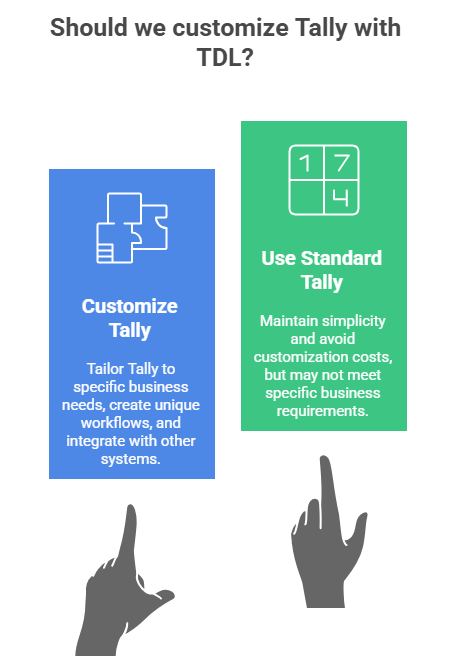
Infographic comparing Customize Tally with TDL versus using Standard Tally, showing benefits of tailored workflows, automation, and integration for SMEs

Why Businesses Should Choose Tally Customization Over Expensive ERP Systems

Many businesses make the mistake of switching to heavy, complex ERP systems when their needs grow beyond standard accounting. But that often brings high licensing fees, long setup times, and complex training.

With Tally Customization, you get ERP-level power at a fraction of the cost.

You’re already using a platform your team knows—now it simply becomes smarter, faster, and more tailored to your process.

Benefits include:

  • Lower cost: You pay only for the features you need.
  • Quick implementation: No migration or retraining required.
  • Better control: Add approval limits, user restrictions, and automation.
  • Scalable growth: Add new modules anytime as your business evolves.

Real-World Tally Customization Examples for Different Business Sectors

Every SMEs or large enterprise has a unique rhythm. Whether you’re in construction, retail, rental, or services, Tally TDL Customization can adapt to your world. Here’s how:

Construction Industry – Accurate Project Costing & Budget Control

Profitability in the construction sector depends on keeping an eye on expenses for different projects, materials, and subcontractors. Tally TDL Customization transforms activities since this intricacy is sometimes outside the purview of normal Tally reports.

With the appropriate modules, you can: 

  • Use job-work or cost-center extensions to track project-wise costs and profits.
  • Create specialized vouchers for contractor billing, milestone payments, and retention.
  • Work and Material Costing: Increase the cost center’s capacity to monitor and assess labor expenses, material transfers, and contractor invoices.

By ensuring real-time visibility of profitability per project, this reduces human error and enhances financial accuracy.

Mobile & Electronics Retail – IMEI & Serial Number Tracking

If you sell electronics or mobile devices, you recognize the importance of tracking IMEI or serial numbers for each item.

Using a personalized IMEI tracking module in Tally:

  • Every transaction of sale or purchase requires the IMEI/serial number.
  • You can track any item from buying to selling in seconds.
  • Guarantee, support, and substitution become effortless and clear.

This not only saves time but also enhances your after-sales process—boosting customers’ trust in your brand significantly.

Rental and Leasing Enterprises – Automated Recurring Billing

For companies in rental and leasing, TDL personalization is revolutionary.

You can develop a Rental Module that records contract information such as:

  • Rental price, length of time, commencement & conclusion dates
  • Amount of deposit and terms for renewal

Tally automatically creates recurring invoices (monthly, quarterly, etc.) and notifies you about renewals or unpaid bills—freeing up hours of manual effort each month.

Infographic showing Tally TDL customization examples for SMEs in construction, mobile retail, and rental enterprises, including project costing, IMEI tracking, and automated invoicing

Universal Tally Customizations Every SME Can Benefit From

Beyond industry-specific needs, there are universal add-ons every SME should consider:

Custom Invoice, Delivery Note & Print Layouts

Your documents reflect your brand. Using TDL, you can create entirely personalized formats:

  • A well-designed invoice format immediately enhances your business’s reputation.
  • Incorporate QR codes, payment links, or electronic signatures.
  • Add vehicle and driver information on delivery challans.
  • Customize packing lists.

A professionally designed invoice layout instantly elevates your company’s image.

Auto-Mail & Report Automation

Manually sending statements or bills by email might be time-consuming.

  • Using the Auto-Mail Module, Tally can automatically:
  • Send PDF invoices via email when a voucher is created.
  • Send out reports to clients or supervisors on a daily or weekly basis.
  • Get business summaries delivered directly to your inbox.

This automation removes tedious administrative tasks and guarantees that nothing gets overlooked

Security, Approval & Access Control Systems

As your business grows, financial control becomes critical. TDL can bring powerful internal checks:

  • Voucher Approval System: Before saving, any transaction exceeding a predetermined sum (let’s say AED 10,000) needs manager approval.
  • Ledger Blocking: Block users from publishing to sensitive ledgers (such as capital or suspense accounts) 
  • Credit Control: Stop sales to customers who’ve exceeded their credit limit.
  • Maker-Checker Concept: One user enters the data, another approves — ensuring zero-error entries.
  • Voucher Delete Restriction: One of the strongest security measures which prohibits users from removing any vouchers or entries without a higher authority’s consent.

These features strengthen accountability, protect sensitive data, and improve audit readiness.
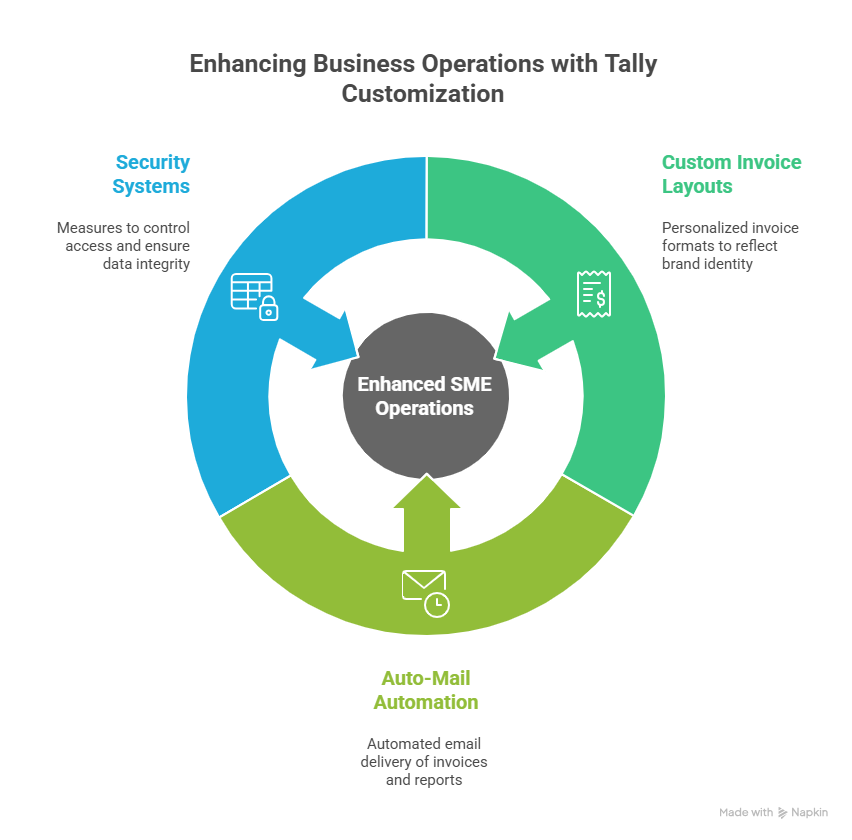
Infographic showing how Tally TDL customization enhances SME operations through custom invoice layouts, automated email delivery, and advanced security systems

Tally Customization in the UAE and GCC Region

For businesses in the UAE and GCC, compliance and efficiency are key.

Custom VAT and corporate tax modules, UAE-specific invoice templates, EmaraTax report integration, and Arabic and English document format localization are all possible with TDL.

In addition to increasing your daily efficiency, working with a Tally TDL developer in the UAE guarantees that your custom modules are constructed in accordance with regional compliance standards.

How Tally Customization Modules Drive Growth and Profitability

When your Tally system aligns perfectly with your process:

  • Data entry becomes faster and error-free.
  • Management gets instant, actionable insights through custom MIS reports.
  • Approvals, controls, and compliance happen automatically.

This means less manual effort, fewer errors, and more time to focus on what truly matters—growing your business.

Final Thoughts: Transform Your Tally, Transform Your Business with Tally Customization

Tally TDL Customization is a deliberate approach to growth, not just an add-on for any business seeking better management and more efficient operations.

Instead of altering your business to fit your software, let your software fit your business.

A well-customized Tally system ensures:

  • Optimized workflows
  • Full compliance
  • Stronger controls
  • Smarter reporting
  • Scalable growth

So whether you’re in construction, retail, manufacturing, or services, customizing Tally is your next big move toward efficiency and profitability.

💬 Ready to customize your Tally?

Collaborate with certified Tally developers in the UAE to create a Tally system tailored to your business needs — more intelligently, rapidly, and profitably.

📞 Call/WhatsApp: +971-54-5863379

📧 Email: sales@tallyprimeerpsoftware.com

🌐 Visit: www.tallyprimeerpsoftware.com 

E-Filing Dashboard in TallyPrime UAE

E‑Filing in TallyPrime UAE: Simplifying VAT Returns for Businesses

Let’s be honest. Nothing makes an accountant more anxious than the approaching deadline for completing a VAT return in the fast-paced, high-stakes business environment of the UAE. One incorrect decimal place might result in a penalty notice that severely reduces your profits, and the Federal Tax Authority (FTA) requires accuracy.

For far too long, companies have been fighting two enemies: the never-ending cycle of human data entry and the fear of unclear compliance. After you’ve recorded your sales and totaled your purchases, the last and most important step is to manually upload your complicated books to the EmaraTax portal after converting them into the precise format required by the FTA.

What if, instead, that procedure could be reduced from a stressful weekend to a single, assured click?

Welcome to the future of UAE financial management. Welcome to E-Filing on TallyPrime.

What is E-Filing on TallyPrime UAE? (The Power of “Connected”)

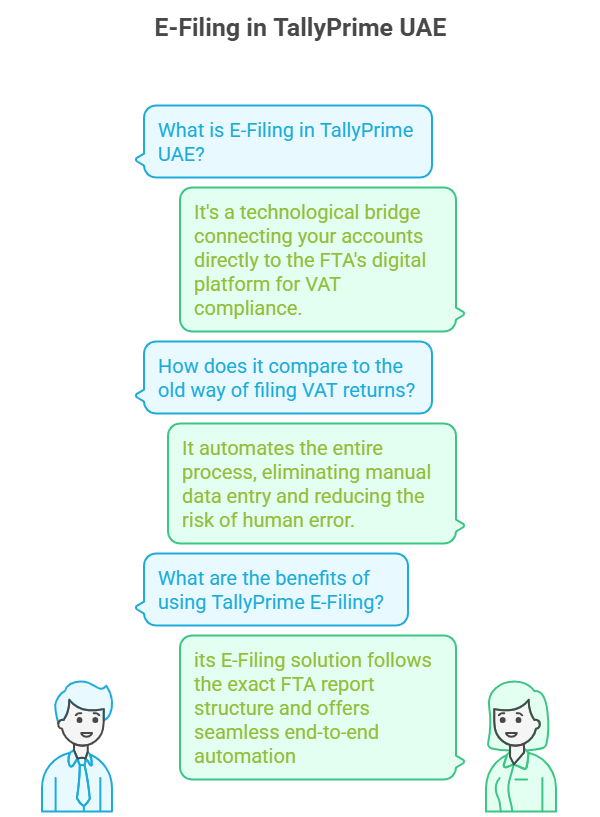
The term E-Filing in TallyPrime UAE is more than just exporting a report; it represents a technological bridge that connects your meticulously managed accounts directly to the Federal Tax Authority’s (FTA) digital platform. Specifically for VAT (Value Added Tax), which remains the cornerstone of UAE tax compliance, TallyPrime offers a Connected VAT Return solution.

Think of it this way: In the old world, you had to print a summary (or export it to Excel), log in separately to the EmaraTax portal, and manually input or upload the data. The chance for human error at that final stage was huge.

The TallyPrime E-Filing solution bypasses this vulnerability. it follows the exact FTA report structure and offers seamless end-to-end automation designed to manage every detail from the moment an invoice is created to the second the final Form 201 is submitted.

This isn’t just about speed; it’s about trust. When your data moves from your accounting records to the regulator’s system with zero human intervention, the accuracy rate approaches 100%.

TallyPrime VAT E-Filing

The Core Difference: Beyond Export

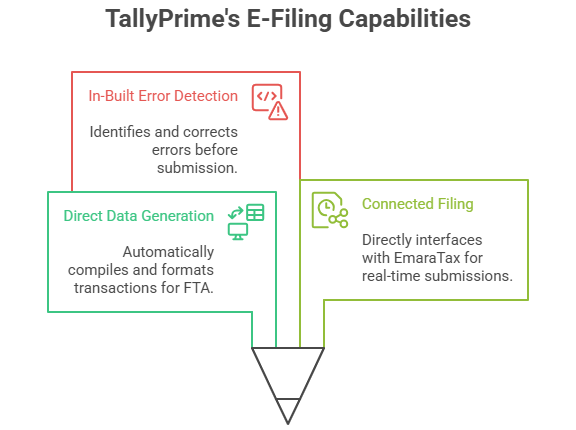
TallyPrime’s E-Filing capability is defined by three key elements, making it the UAE’s gold standard for VAT compliance software:

  1. Direct Data Generation: The software compiles all transactions, segregates them by Emirate (as required), and formats the final report precisely into the FTA’s mandatory structure.
  2. Connected Filing: Advanced versions of TallyPrime allow you to directly interface with the EmaraTax portal. You prepare the return in Tally, generate the required file, and submit it with real-time status updates and confirmations, all while the system automatically populates complex sections like Reverse Charge or Import VAT.
  3. In-Built Error Detection: Prior to submitting any filing, TallyPrime identifies frequent errors—absent TRNs, misclassified tax ledger groups, date errors, or inconsistencies in the Emirate-wise sales breakdown. It requires accurate data prior to producing the return, functioning as your internal pre-audit control. Eliminate concerns about penalties for manual errors.
Infographic highlighting key TallyPrime E-Filing capabilities and VAT compliance tools in UAE.

This strong ability provides business owners with a unique advantage: Compliance Confidence.


The E-Filing Workflow: How to File VAT Return in TallyPrime

The entire E-Filing process, once set up correctly, becomes a smooth, repeatable routine. Here is your confident, step-by-step guide to generating and submitting your VAT Return (Form 201) using TallyPrime.

Step 1: The Daily Discipline (Data Entry)

The accuracy of your filing begins with your daily transactions. E-Filing is only as good as the entries you make.

Action: Make sure that each sales invoice, purchase bill, credit note, and expense voucher is entered into TallyPrime with the correct VAT Rate (5%, 0%, Exempt) and the relevant TRN (Tax Registration Number) for your entity.

TallyPrime Benefit: The application guarantees FTA-compliant invoice creation, frequently offering bilingual (Arabic/English) printing and automatically computing the tax element, reducing manual mistakes from the start.

Step 2: Generate the Form 201 Report

This is where TallyPrime’s intelligence takes over.

Action: From the Gateway of Tally, use the Go To feature (Alt+G) and type or select VAT 201.

Review: The report instantly populates the official Form 201 structure. Carefully review the Taxable Sales and Output VAT, and the Taxable Purchases and Recoverable Input VAT sections. Drill down into any line item to see the supporting transactions.

TallyPrime Advantage: Use the Exception Report feature within the VAT 201 screen. This vital tool highlights transactions that might be excluded or require corrections (e.g., incomplete Vouchers, misclassified transactions, or transactions with invalid VAT details). Resolve every exception before proceeding.

Step 3: Save and Export the Return File

Once you are 100% satisfied that your VAT 201 report is accurate and all exceptions are cleared, you lock it in.

Action (Traditional Method): Select the appropriate period, click the Export button, and choose the FTA-prescribed format. Save the file to your computer.

Action (Connected Method): If using the latest TallyPrime releases with connected services, you can often “Submit Return” directly from the TallyPrime screen. The system securely sends the data package to the FTA.

Step 4: Upload to the EmaraTax Portal

If you used the traditional export method, this is the final manual step.

Action: Log in to your company’s account on the official EmaraTax portal.

Process: Go to the VAT Return section for the applicable tax period. Choose the Upload File option and select the file you exported from TallyPrime.

Verification: The FTA system will instantly read the Tally-generated file and populate all the fields in your online Form 201. Crucially, ensure the values match your TallyPrime VAT 201 report exactly.

Step 5: Submission and Payment

The moment of truth—your final compliance commitment.

Action: Examine the auto-filled return one final time for any system mistakes (very unlikely in a TallyPrime file). Press Submit and finish the declaration.

Payment: If the return leads to a Net VAT Payable amount, make the payment promptly using e-Dirham, bank transfer, or GIBAN, ensuring the FTA receives the payment before the deadline


Why E-Filing on TallyPrime is Your Undisputed Advantage

(TallyPrime E-Filing Benefits, Automated Compliance UAE)

In the competitive UAE market, efficiency is the new currency. By mastering E-Filing in TallyPrime, you are not just saving time; you are building a more robust, agile, and auditable business—qualities that attract better investors, partners, and customers.

1. Eliminating Compliance Blind Spots (Risk Mitigation)

E-Filing through TallyPrime means you are always working with the latest FTA formats. This constant updating drastically lowers the risk of penalties—which start at AED 1,000 for a simple late filing and escalate rapidly. Zero penalty risk is the ultimate business advantage.

2. The Audit-Ready Advantage (Transparency)

TallyPrime maintains a complete, digital audit trail. From the moment you save the VAT 201 report to the final submission, every single figure can be traced back to its original invoice. Should the FTA call for an audit, you can instantly generate the required VAT Audit File in the prescribed ASCII format with a single click. This unparalleled data transparency makes audits stress-free.

3. Optimizing Cash Flow (Financial Health)

When your return preparation is reduced from days to minutes, you gain real-time clarity on your tax liability. You know your exact cash position sooner, allowing you to manage your funds and working capital with greater precision. Smarter cash flow management is the direct result of automated compliance.

4. Ultimate Scalability (Future-Proofing)

As your UAE business grows, your transaction volume explodes. A manual process breaks under this stress. TallyPrime handles thousands of entries with the same ease as a handful. It allows you to scale your financial operations indefinitely without hiring an army of data entry staff.


Final Verdict: Move from Anxiety to Authority

If you’re still manually reconciling figures or nervously copying data into the EmaraTax portal, you’re operating with a significant competitive handicap.

E-Filing on TallyPrime UAE is not a luxury; it is a fundamental requirement for any serious business committed to growth and long-term stability in the Emirates. It’s the difference between merely doing business and mastering compliance.

Ready to ditch the filing anxiety? Embrace the precision of TallyPrime and transform your VAT compliance from a deadline scare into an act of confident, effortless financial authority. The time you save is the time you invest back into your business—the ultimate win-win in the UAE’s dynamic economy.

Before the FTA Calls, Call Us.

As a Trusted Tally Gold Partner, Matrix Technologies provides more than software—we deliver 100% FTA Compliance Confidence.

Book Your FREE TallyPrime E-Filing Consultation Today!

Tally on mobile interface showing sales, order, receipt, and report options on smartphone – enabling Tally ERP access for van sales, invoicing, and business management on the go.

Tallymate Taking Tally Beyond the Desktop

Power of Accounting in Your Pocket

In today’s fast-paced business world, one thing is clear: mobility is power. Business owners, accountants, and decision-makers can no longer be restricted to a desk to retrieve essential financial information. Choices can’t postpone until your return to the workplace. Inventory checks need to occur on the warehouse floor. Invoicing should occur immediately after a deal is finalized, not hours later.

This is precisely what TallyMate provides.

TallyMate extends the power of Tally ERP beyond its traditional setup, seamlessly connecting your workflows across devices. Designed for van sales teams, field agents, and dynamic businesses, it provides essential features with innovative tools, offering flexibility and capabilities that go beyond standard Tally.

The Desktop Dilemma: Why Mobile Tally is Non-Negotiable

Before exploring the wonders of TallyMate, let’s recognize the challenges it addresses. Operating a business exclusively with a desktop-based accounting system, even one as powerful as Tally Prime, presents significant risks:

  1. Mobile-First Interface: Designed specifically for smartphones and tablets with clean navigation, role-based dashboards, and touch-friendly entry forms. Everything you need from Tally, simplified for on-the-go use.
  2. Real-Time Invoicing and Orders: Create professional, Tally-compliant invoices or sales orders directly from your phone. Perfect for van sales, on-site billing, and door-to-door distribution teams.
  3. Instant Collections and Receipts: Record payments and receipts instantly — complete with image attachments for proof of payment. Speed up your reconciliation process and maintain accurate ledgers from anywhere.
  4. Enterprise-Grade Security: Built with advanced encryption and secure synchronization. TallyMate allows safe one-way data sync while maintaining role-based access control so every user sees only what they need.
  5. Windows-Compatible Data Entry: Experience seamless data input on mobile that mirrors your Windows-based workflow. All entries sync back effortlessly with your desktop Tally setup for consistency and reliability.

TallyMate addresses these challenges by safely synchronizing your crucial Tally data—whether from TallyPrime or earlier Tally.ERP editions—and displaying it in an easy-to-use, specially designed mobile interface. This is what genuinely distinguishes a simple remote access option from a powerful Tally integration designed for mobile workflow.

Unleashing the Power of TallyMate: Key Features That Define Financial Freedom

TallyMate transforms the way you interact with your financial data. Its strength lies in its ability to translate Tally’s complex power into simple, actionable mobile tools.

1. Real-Time, Role-Based Reporting: Data on Demand

Imagine a scenario: you are in a meeting with a supplier. With TallyMate, you don’t need to call your accountant. You simply pull up the Tally on mobile app and instantly view:

  • Cash & Bank Balances in Real-Time: Track liquidity for prompt payment choices.
  • Sales Performance Dashboards: Monitor daily, weekly, or monthly sales data for any branch or representative.
  • Exceptional Receivables/Payables: Utilize ageing reports to strategize immediate cash collections or supplier payments.

TallyMate’s role-based access is a game-changer. Your sales manager only sees sales reports; your field technician only sees inventory stock; the business owner sees it all. This ensures both security and focus.

2. Seamless Transaction Entry: The Field Agent’s Ledger

One of the most powerful features of TallyMate is its ability to facilitate real-time data entry from any location. This dramatically accelerates the financial closure process and eliminates end-of-day data entry backlogs.

  • Spot Invoicing and Order Booking: Your sales team can generate a professional Tally-compliant invoice or sales order the instant a customer commits. No more manual chits or delayed entries. Perfect for van sales, retail routes, and trade counters.
  • Expense Vouchers on the Go: Field staff can promptly log travel, fuel, or various expenses, frequently attaching a receipt photo. This ensures that reconciliation and audit trails are effortless.
  • Inventory Updates: Check stock by location, adjust quantities after deliveries, and avoid stock-outs. An essential feature for effective inventory management with Tally Prime mobile.

3. Enhanced Security and User Experience: A Secure Mobile Tally

Protection is crucial when handling confidential financial information. TallyMate is established on a base of trust:

  • Enhanced Encryption: The data exchanged between your Tally setup and the mobile application is protected by top-tier encryption standards.
  • One-Way Data Synchronization: All additions made on the phone are safely synchronized to your desktop Tally, while confidential desktop information isn’t kept on the mobile device.
  • User-Friendly Design: TallyMate is specifically crafted for mobile devices, simplifying Tally’s intricate key sequences and layered menus with straightforward, touchscreen-friendly navigation and impressive visuals. This significantly lowers the learning barrier for users without accounting backgrounds.
  • Future-ready web integration: Currently built for mobile + desktop sync; planned web integration will enable browser-based access for managers and remote teams.

Use Cases: How TallyMate Helps Businesses Every Day

  • Van Sales & Field Distribution: Sales reps confirm stock availability, create spot invoices, collect payments, and sync all transactions to Tally — eliminating end-of-day paperwork.
  • For Business Owners: Swiftly examine sales reports, monitor pending payments, and authorize expenses while on the move.
  • For Accountants: Create VAT reports, balance bank accounts, and deliver immediate updates to clients—even when remote.
  • For Sales Teams: Verify stock availability prior to confirming orders with clients.
  • For Leaders: Track team productivity and business KPIs instantly.

Regardless of your position, TallyMate adjusts to suit your requirements.

TallyMate: Powering the Modern Business Owner

For today’s entrepreneur, the idea of “Tally on phone” is no longer a luxury — it’s a necessity for staying efficient and agile. TallyMate was built precisely for this purpose, making your accounting and business management as mobile as you are.

  • How to use Tally on your mobile phone? With TallyMate, the solution is straightforward—sign in, oversee entries, and maintain control from any location.
  • Searching for the top Tally mobile application for Android or iOS? TallyMate provides the familiar Tally experience, redesigned for your mobile device.
  • Require smooth inventory management while on the move? TallyMate assists you in monitoring, synchronizing, and refreshing inventory instantly.

What distinguishes TallyMate is its emphasis on business results, rather than merely on features. It’s about returning your time, enhancing your cash flow clarity, and keeping your data secure.

The Road Ahead — Mobile Today, Web-Ready Tomorrow

TallyMate currently focuses on powerful mobile-first workflows while keeping your desktop Tally as the authoritative ledger. Looking forward, web integration will allow managers and remote teams to access and act from a browser — completing the mobility triangle: desktop + mobile + web.

This phased approach ensures reliable Windows-based data integrity while expanding access and collaboration across platforms.

Conclusion: Run Your Business Anywhere with TallyMate

Adaptability is essential in today’s dynamic corporate environment. Your accounting and management won’t be restricted to an office desk thanks to TallyMate. Whether you’re at work, home, or on the road, having Tally on your phone enables you to manage inventory, van sales, authorize invoices, monitor cash flow, and make decisions instantly.

TallyMate is more than just a smartphone app for professionals, business owners, and growing companies; it’s your trustworthy partner for smart, safe, and simple accounting. If you’ve ever been curious about utilizing Tally on mobile or looked for the top Tally app for Android or iOS, the solution is here.

You can stay ahead of the game at any time and from any location with TallyMate’s effective and portable business management solutions.

Ready to Experience TallyMate?

Don’t just read about it, try it for yourself!
👉 Book Your Free Demo Today or Contact Us to see how TallyMate can transform the way you manage your business.

Tally Prime ERP UAE software for SMEs and small businesses

Why TallyPrime is the Best ERP Software for SMEs in UAE

From VAT Compliance to Seamless Inventory, Discover Why TallyPrime is the Ultimate Business Management Solution for Your SME in Dubai and Beyond.

It’s thrilling as well as challenging to run a small or medium-sized business in UAE. On one hand, a booming economy offers you immense opportunities. On the other hand, you frequently have limited resources to manage complex business procedures like payroll, inventory, accounting, finance, and VAT compliance. This is where the industry is transformed by effective and user-friendly ERP software.

While many options exist, one name stands out as the go-to choice for a reason: TallyPrime. It’s not merely an accounting software; it’s an all-in-one business management solution. why Tally Prime for small business UAE is the smartest choice, and why so many entrepreneurs across Dubai, Abu Dhabi, and other Emirates rely on it to simplify their accounts.

More Than Just Accounting: The Core Features That Matter

TallyPrime is more than just a Tally update.ERP 9 is a total reimagining of what software for business management ought to be. With modern features and an incredibly user-friendly design, it improves on Tally’s simplicity, reliability, and strong accounting.

Unrivaled User-Friendliness & Simplicity

The learning curve is a major challenge for any small company using new technologies. This is the area in which TallyPrime truly excels. Even a business owner with no professional accounting background can start using it in a matter of minutes thanks to its incredibly clear and user-friendly layout. The “Go To” option is revolutionary, enabling you to find and access any report or function immediately without having to recall complex menu routes. This straightforwardness shortens your team’s training duration and aids in achieving a rapid ROI.

Comprehensive Business Management

In contrast to standard accounting software, TallyPrime is a comprehensive Tally Prime ERP solution for the UAE. It controls all elements of your business activities from one platform.

Financial Accounting: Structures each transaction into organized reports such as balance sheets and profit & loss statements, ensuring business owners maintain a transparent understanding of their financial situation

Stock Management: Monitor your inventory levels in real-time. TallyPrime assists in tracking batches and expiry dates, managing inventory across multiple locations, and setting reorder levels, so you never deplete essential stock.

Payroll: Handle your workforce payroll effectively, encompassing salary management, attendance tracking, and producing payslips. TallyPrime also assists with compliance regarding the Wages Protection System (WPS).

This holistic approach means you can streamline all your business processes in one place, which is a huge benefit for small teams.

TallyPrime and VAT Compliance in the UAE

Since the UAE implemented VAT, businesses have been quite concerned about compliance. The good news is that Tally Prime VAT UAE features are made especially to make this process easy.

TallyPrime is among the limited software options that guarantee your business stays compliant with the Federal Tax Authority (FTA) regulations. It automatically calculates and include VAT on your invoices, manages zero-rated, exempt, and reverse-charge transactions, and assists you in producing precise VAT returns in the necessary format. The integrated error detection guarantees your returns are correct prior to submission, protecting you from possible penalties and audits The integrated compliance of TallyPrime renders it an essential resource for companies in the region.

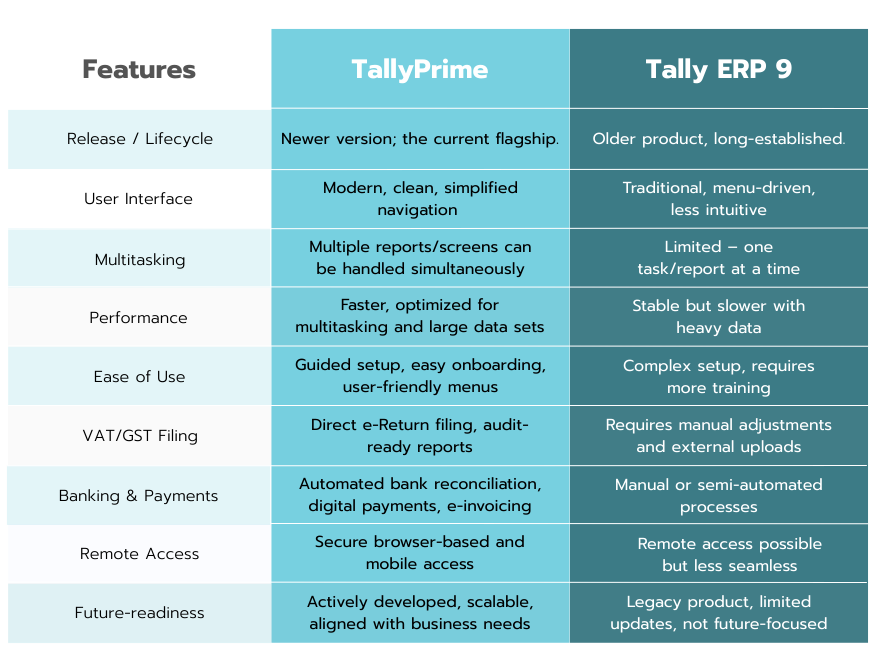
The TallyPrime vs. Tally.ERP 9 Difference

If you’re an old-school user, you might be wondering, “Why upgrade from Tally.ERP 9?” It’s a valid question. While Tally.ERP 9 was an incredible software, TallyPrime is entirely a different beast.

Many businesses in the UAE still use Tally.ERP 9. While it has served well, ERP 9 is no longer even a close race. TallyPrime is more user-friendly, quicker, and more suited to the contemporary business environment in UAE. You won’t want to go back once you upgrade from a basic phone to a smartphone. It’s like upgrading from a basic phone to a smartphone—you’ll never want to go back.

Interested in exploring more on the significant distinctions between TallyPrime and Tally.ERP 9? Our blog, TallyPrime vs Tally.ERP 9, provides a thorough comparison that explains how the upgrade can enhance your business.

Beyond the Features: Other Key Benefits

Security & Control

Your financial data is your most important resource. TallyPrime provides robust security features, including access control tailored to users, data encryption through TallyVault, and detailed audit logs. You can accurately specify who can access it, ensuring that your private information stays protected.

Cost-Effective & Flexible Licensing

Small companies often lack large IT budgets. A Tally Prime license in the UAE provides top-tier ERP software for a small portion of the price of other enterprise solutions. Additionally, it’s adaptable—you can begin with the basics and incorporate more as your business grows. The Tally Prime license in the UAE can be acquired through a One-time purchase.

Local Support & Ecosystem

Tally boasts a significant presence and a robust network of certified partners in the UAE. This indicates you can utilize outstanding local assistance, training, and personalization services. If you require a tally installation guide in the UAE or a quick solution, assistance is always just a phone call away

Small business ERP UAE TallyPrime user working on finances

How to Get Started

Beginning with TallyPrime has never been easier. As a certified Tally partner in the UAE, we offer tailored support to assist you in maximizing this robust ERP solution. Whether you seek a complimentary demo, a detailed guide, to download TallyPrime 6.2, or help in establishing your company and configuring VAT, our team is available to assist you at every stage.

This is how SMEs typically start:

Get a UAE Tally Prime License: Check our Pricing page for single-user and multi-user license. You can choose based on your requirements.

Onboarding & Training: Your team can learn quickly due thanks to the local Tally partners and online training.

Customization & Growth: As your business grows, you can add new functionalities and enhancements. Book a free demo with Matrix today to receive a free customization.

Final Thoughts

For UAE SMEs, efficiency and adherence to regulations can determine the difference between thriving and facing challenges. Tally Prime ERP UAE offers companies a strong, cost-effective, and user-friendly ERP solution that evolves alongside their growth. It streamlines everyday bookkeeping, guarantees VAT adherence, and provides the adaptability that small enterprises genuinely require.

If you’re looking for the top ERP software for small businesses in Dubai or anywhere in the Emirates, Tally Prime for small businesses in the UAE stands out as the best choice. It’s not merely accounting software—it’s an entire business solution customized for your achievement

At Matrix, we recognize the difficulties that small and medium enterprises encounter in the current ever-changing market. That’s the reason we provide more than just software — we offer a comprehensive business solution. TallyPrime allows you to optimize your operations, adhere to UAE regulations, and confidently concentrate on expanding your business.

Ready to elevate your business to new heights? Contact us today and book your free demo with Matrix Technologies LLC, an Authorized Tally Gold partner.

Businessman using Tally on mobile outside to manage accounts on the go

Your Office Is Where You Are: The Game-Changing Power of Tally on Mobile & Web

Remember that feeling of panic? Out of the office, you might be attending a client meeting or taking a much-needed vacation, but a critical inquiry arises regarding your company’s financial statements. Your team requires an immediate response. What’s the remaining amount on that bill? What’s your cash flow situation for this quarter? The only way to get the information is to call someone at the office, have them dig it up, and then relay it back to you. It’s awkward, clumsy, which often leads to frustration and delayed decisions.

But what if you didn’t have to do that anymore? What if the financial pulse of your business was always in your pocket, just by tapping a few buttons on your smartphone? Tally on Mobile & Web makes that a real possibility now. This is more than just a new feature—it’s a fundamental change in how you manage your company, allowing you to take better, quicker choices anytime, anywhere.

Beyond the Desktop: What Does Tally on Mobile & Web Really Mean?

Tally has supported numerous companies as their foundation in accounting for many years. It’s reliable, powerful, and well-respected. But the old way of doing things was tied to a computer. The mobile and web version of “Tally” lets you escape that. It’s about securely accessing your TallyPrime reports through a web browser on any device—be it your smartphone, a tablet, or even a different computer.

This isn’t just some glorified screen-sharing. It’s a dedicated, purpose-built portal for reports. Here’s what it allows you to do:

View Key Reports: Instantly check your Balance Sheet, Profit & Loss A/C, Stock Summary, and more.

Drill Down for Detail: See a suspicious figure? You can drill down to the voucher level right from your browser to investigate.

Download & Share: Need to send a client their outstanding invoice or share a report with your CA? You can download them as PDFs and share them directly.

Think of it as having a miniature, secure version of your Tally data in the palm of your hand. No more frantic calls, no more “I’ll get back to you.” Just instant, accurate information.

The Human Impact: Why Tally on Mobile & Web Matters for Business Owners

We’re not just talking about software; we’re talking about your life. A business owner’s or a key decision-maker’s day is filled with chaos. You’re having meetings with clients, going on trips, participating in conferences, or perhaps taking some time off for leisure. The business, however, never stops. This is where Tally on Mobile & Web truly shines.

It gives you back something invaluable: your time and peace of mind.

Make Decisions on the Spot: Imagine yourself having to check your payables at a vendor’s office. With your phone, you can see the exact amount owed, giving you leverage in negotiations.

Empower Your Team: Give your sales team access to their sales reports on the go. They can stay motivated by viewing their performance in real time. Your finance manager can approve expenses from a coffee shop. The goal is to speed up procedures and distribute power.

Stay in Control, Effortlessly: You no longer need to be physically present to know what’s happening. This level of oversight, without being intrusive, allows you to maintain control while embracing a flexible, modern work style.

Security First: How Tally Keeps Your Data Safe Online

I know what you’re thinking. “My company’s financial data? Accessible on a web browser? Is that even safe?” It’s a valid and important question. Tally has built this feature with security at its core.

Here’s how they keep your data under lock and key:

Your Data Stays With You: The data isn’t stored on some third-party cloud. Your TallyPrime installation, which is on your own computer, acts as the primary source. The web browser only fetches the specific report you request and then displays it. The data itself never leaves your machine.

Secure Login: Access is granted only through your unique Tally.NET ID and password. It’s a secure, authenticated gateway.

Complete Control: As the administrator, you choose who can see what. To maintain strict control over sensitive data, you can grant specific employees access to only certain reports. For example, a sales executive might simply require access to their personal sales data and not the entire balance sheet of the business.

It’s a solution made to provide you with the utmost ease without sacrificing the security and privacy that Tally has long been known for.

Getting Started: It’s Easier Than You Think

The best part? Enabling this feature is surprisingly simple. If you have TallyPrime with a valid TSS (Tally Software Services) subscription, you’re halfway there.

Tally Web Access

You just need to do a one-time setup:

Enable Web Access: From your TallyPrime application, enable Tally.NET Services.

Add Users: For each person who needs access, create a Tally.NET User ID and assign them the specific security level they need (like “Tally.NET User” or “Tally.NET Auditor”).

Connect: Make sure your main computer with Tally is connected to the internet, and then simply log in from a browser using your credentials.

It’s truly that straightforward. No complex server setups, no IT wizardry required. It’s a feature built for real business people who don’t have time to be tech gurus.

Tally Remote Access

Along with Web/Mobile reporting, TallyPrime offers Remote Access for those who need to handle company data from outside the office.

With Remote Access, you can:

Record transactions (sales, purchases, payments, receipts, vouchers, etc.).

View and analyze reports in real-time.

Work from a client’s office, a branch location, or even home as if you were sitting in front of your main Tally computer.

Here’s what you require for Remote Access:

In your office setup: a valid TallyPrime license, an active TSS, internet access, and your business linked to Tally.NET services.

At the remote location: a TallyPrime setup and an internet link.

For seamless connectivity, both the server and remote systems need to be on the identical version of TallyPrime.

Remote Access is ideal for accountants, auditors, or finance teams who require comprehensive functionality in Tally (beyond merely viewing reports)

Conclusion: The Future of Business is Flexible

In our fast-paced world, being chained to your desk is no longer an option. It is now necessary to be able to work and make wise decisions anywhere. Tally on Mobile & Web is more than just an upgrade in technology; it’s a way of thinking that fits well with today’s businesses.

It provides you with flexibility, information, and guarantees that your business operations are as seamless as your daily life. If you’re using Tally but haven’t taken advantage of this feature, you’re missing out on a big opportunity. Take a moment to explore it. You’ll wonder how you ever managed without it.

So, go ahead. Take that trip. Go to that client meeting. Your business reports are ready when you are.

Tallyprime vs tally ERP 9

TallyPrime vs. Tally ERP 9: Your Ultimate Guide for Choosing the Best in 2025

For many years, Tally has been the go-to name for accounting and business management. Whether you’re a small shop owner or a big company, millions of people have relied on Tally to keep their financial records in order. Tally ERP 9 was the backbone of this trust, known for being a reliable and dependable tool that always got the job done.

In 2025, when businesses operate under high pressure due to rapid changes, they need systems that can handle efficiency, automation, and remote work efficiently. Does the old system still hold up?

TallySolutions introduced TallyPrime, a new software that revolutionizes business operations.

This isn’t just a simple update, it’s a complete transformation.

As you get ready for next year’s finances, you may wonder: Which option suits your company best? Let’s take a close look at both options to help you make the right decision.

Tally ERP 9: The Legacy of Trust

Before we decide on a winner, we need to give credit where it’s due.

Tally ERP 9 was, and in many ways still is, a remarkable piece of software. It brought enterprise-level planning to small and medium-sized businesses by making complex tasks easier.

Some of the core features included:

  • Robust Financial Management: ERP 9 provided a comprehensive set of features, ranging from budgeting and multi-currency to ledgers and accounts payable.
  • Integrated Inventory Control: Inventory management was made possible by batch-wise tracking, numerous godowns, and stock groups.
  • Reliable Compliance: Companies found it easier to comply with legal requirements, such as properly processing payroll and paying taxes.
  • Simple Interface: Quick navigation through menus and efficient use of keyboards, enabled skilled individuals to operate effectively.

However, the simplicity that made it popular also had its downsides.

The old-style interface and missing modern functions such as real-time multitasking and cloud connectivity made it hard for this software to be useful in today’s busy work world where people want more from their programs.

TallyPrime: The Future of Business Management

TallyPrime isn’t merely an updated version of ERP 9; it’s a reimagined experience.

It retains the core features of Tally ERP 9 but adds modern, user-friendly tools designed for today’s business world. The main advantage is that TallyPrime helps you save time by automating repetitive tasks, allowing you to focus on growing your business.

1. Unmatched User Experience & Navigation

A Modern Look for a Modern Business: The sleek, easy-to-read interface and signature blue theme are a welcome change from the old green screen. The clean design helps reduce visual clutter, allowing you to focus on your data without distractions.

The “Go To” Power: Imagine a search bar that applies to the entire company. By entering a few keywords, you may quickly locate any report, voucher, or setting using the “Go To” tool. Every operation will be effortless since you won’t have to memorize complicated keys or navigation paths to.

Smooth Multitasking: You can work on multiple tasks at once in a single window using TallyPrime. It’s simple to put an invoice on hold, review a crucial report, and then resume your work precisely where you left off without losing any work. In terms of everyday productivity, this is a game-changer for daily productivity.

Analyze Faster, Plan Smarter: The ability to save a particular view of a report is a huge time-saver. Once you’ve filtered and customized a report to your needs, you can save that specific view for quick, one-click access in the future, allowing for faster recurring analysis and better decision-making.

2. Banking and Automation Built for Efficiency

Manual data entry for banking is not only time-consuming but also prone to errors. TallyPrime introduces powerful automation that streamlines your banking processes in the UAE:

  • Automated Accounting: Bank statements may now be imported straight into TallyPrime, which will create the appropriate vouchers for payments and receipts.
  • Smarter Reconciliation: The one-click auto-reconciliation feature is a massive time saver. It automatically matches transactions and even provides smart suggestions for unmatched entries.
  • Connected Banking: This feature gives you a clear picture of your cash flow by allowing you to monitor live bank balances and real-time updates for partner banks without ever leaving the app.

3. Seamless Compliance and Multilingual Support

Compliance is a must for companies operating in the United Arab Emirates. In this sense, TallyPrime is made to be your reliable partner. It provides a range of advanced features that go beyond basic tax computations, giving you the assurance that your company is constantly operating in full compliance with local tax regulations.

You can easily manage your whole VAT cycle from beginning to end with TallyPrime’s Connected VAT e-Return feature. Everything can be handled straight from TallyPrime, including:

  • Generating VAT-compliant invoices that meet all local requirements.
  • Preparing and filing VAT returns with a single click.
  • Submitting returns straight from your accounting program to the FTA portal.
  • Tracking the status of your returns and even accessing refund details within TallyPrime itself.

The built-in Edit Log feature provides a powerful audit trail, recording every change made to a voucher or master. This feature ensures total transparency and helps you stay audit-ready.

Furthermore, TallyPrime ensures you can communicate professionally with all your clients, regardless of their native language. It offers robust multilingual capability, allowing you to create and print bilingual invoices in English and Arabic that are fully compliant with local regulations.

Learn more about TallyPrime’s features on their official site here

Migration Realities — What You Must Know

There are always concerns regarding effort and safety while upgrading to new software. Although Tally simplifies migration, there are still important things to think about before making the switch.

Migration Essentials

The migration is smooth but one-way: ERP 9 cannot open the same data after switching to TallyPrime. Always make sure to back up your data before starting.

Tally offers tools and guides to help with migration. Most businesses switch without any major issues.

Before going live, you should test the migrated data by running trial balances, GST reports, and reconciliation statements.

Customizations: If you’re using TDLs in ERP 9, make sure to check with your partner to ensure they can be moved over to TallyPrime.

Migration Checklist

  1. Back up your ERP 9 data.
  2. Install TallyPrime on a test computer.
  3. Run the migration tool.
  4. Check reports and compliance.
  5. Train users on the “Go To” feature and how to navigate using multitasking.

The Verdict: Is It Time to Upgrade?

In 2025, the business world is moving fast, and there’s little room for inefficiency.

Though ERP 9 is still reliable, most businesses will find that TallyPrime offers faster performance, better compliance, and more flexibility to support growth.

Why Upgrade to TallyPrime

  • Save time: Multitasking and “Go To” save hours each week.
  • Go digital: Workflows are streamlined by remote access and banking automation.
  • Stay compliant: With features like VAT e-Return and Edit Log, it is audit-ready and constantly updated with tax changes.

While Tally ERP 9 is still reliable for older systems with many customizations, it’s not ready for the future.

If your goals are growth, efficiency, and compliance, TallyPrime is the better choice.

Final Word

In 2025, the decision isn’t just about choosing between old and new software.

It’s about choosing between staying functional or growing smarter. TallyPrime isn’t here to replace what worked, it’s here to take it even further.

For businesses that want to thrive, not just survive, the future is TallyPrime.

Ready to move beyond ERP 9? Our team can help you transition smoothly. Book a free consultation with our experts.

Matrix Getting honored for Loyalty Legends

A Moment of Pride: Celebrating 15 Years of Dedication and Recognition

Matrix Technologies LLC stood brightly in the spotlight, receiving a heartfelt tribute at the Tally partner award ceremony—an exceptional occasion celebrating our steadfast loyalty and collective journey. With sincere applause, Arif and Ibrahim were honored as the “Loyalty Legends,” representing excellence, commitment, and the deep connections that characterize our Tally gold partnership with Tally Solutions

15 Years in the Making: A Story Built on Trust and Growth

Fifteen years back, Matrix embarked on a clear mission: to provide exceptional IT solutions and build strong relationships. From integrating Tally ERP systems to designing intelligent, adaptable digital workflows, each phase has focused on more than just numbers—it’s been about people, learning together, evolving together.

Throughout these years, we’ve expanded—not only in size but also in spirit. Our path has been influenced by every client achievement, each late-night solutions, and the trust given to us. Receiving an award from Tally for our faithfulness feels more like a genuine acknowledgement of the dedication our entire team has put forth.

Arif & Ibrahim: True Behind-the-Scenes Champions

Let’s take a moment to shine a light on the individuals who helped make this milestone possible—Arif and Ibrahim. Their passion, perseverance, and unwavering spirit have steered countless projects to success. Being recognized as “Loyalty Legends” is more than a label. It’s an acknowledgment of their dedication, compassion, and unwavering commitment. Their energy motivates us all, every single day.

Why This Recognition Matters

This award isn’t merely a decoration on a shelf—it symbolizes our fundamental principles. Receiving recognition from Tally, a highly respected name in business management software, proves what we’ve always believed: strong partnerships built on trust, transparency, and excellence withstand the test of time.

It’s a moment that makes us pause, smile—and feel a strong sense of pride. Proud of our origins, proud of the team that propelled us ahead, and excited for the paths we will continue to walk together

Looking Ahead: More Than an Award, a Promise

While we enjoy the warmth of this acknowledgment, we are focused on what lies ahead. We’re more motivated than ever to create, to enhance our service, and to boost this culture of loyalty and excellence. Under the leadership of Arif, Ibrahim and the whole Matrix family, the upcoming chapter guarantees even more compelling tales of progress and achievement.

To everyone who has journeyed with us, clients, team members, and partners. You’re at the heart of this celebration Cheers to additional milestones, countless memories, and more collective successes. May the upcoming 15 years shine even more brightly!

How to file Vat returns in UAE

How to file VAT Returns in UAE using TallyPrime

After the introduction of VAT in 2018, businesses in the UAE are required by law to maintain precise records and file VAT returns to the Federal Tax Authority (FTA). For many companies, this process appears complex. Especially when managing different invoices, expenses, and changes to track.

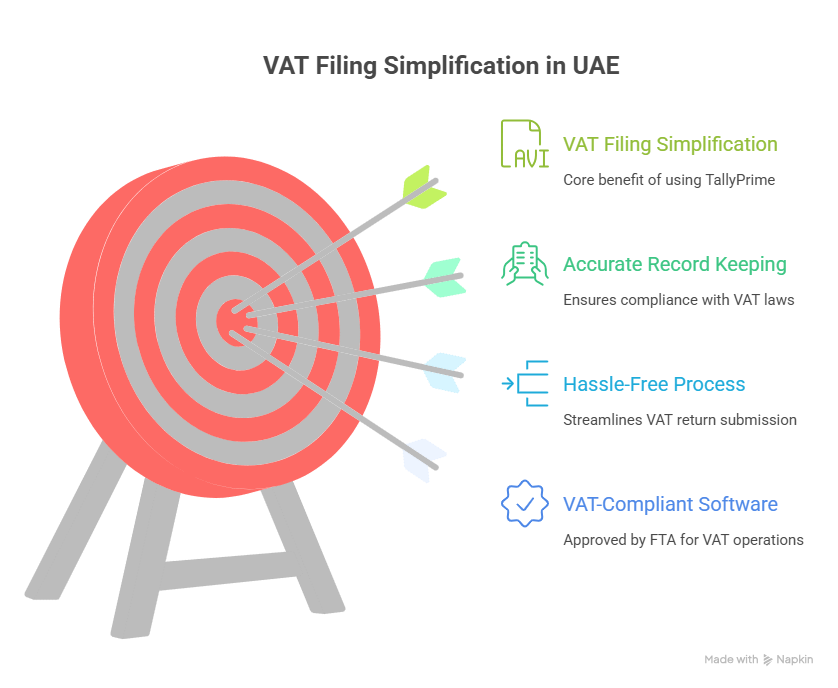
That’s where TallyPrime comes into play. TallyPrime, approved by FTA as VAT-compliant software, streamlines VAT return filing, guaranteeing accuracy and ease. This guide will detail exactly how VAT filing works in the UAE using TallyPrime.

Step 1: Confirm VAT Is Activated in TallyPrime

VAT needs to be set up in your company settings prior to generating returns.

  1. Open you company in TallyPrime.
  2. Navigate to F11: Features > Statutory & Tax.
  3. Activate VAT and provide your TRN (Tax Registration Number).
  4. Select UAE VAT as your taxation method.
  5. Establish tax rates according to your business category (5%, 0%, or tax-exempt).

After completion, TallyPrime will automatically apply VAT to every invoice, purchase, and credit note.

Step 2: Accurately Document All Transactions

VAT returns depend on accurate data input. In TallyPrime, you can:

  • Generate sales invoices that comply with VAT requirements, including customer TRN, invoice number, and VAT details.
  • Record purchase invoices along with supplier TRN and reclaim input VAT.
  • Accurately record zero-rated and exempt supplies.
  • Manage reverse charge transactions where applicable.

Pro Tip: Consistently verify entries with FTA standards to prevent inconsistencies.

Step 3: Create the VAT Tax Calculation Report

After transactions are recorded, TallyPrime automatically generates a VAT Computation Report, detailing:

  • Output VAT (gathered from sales).
  • Input VAT (paid on acquisitions).
  • Changes such as reverse billing.
  • Total VAT owed or to be reimbursed.

To view it:

  1. Go to Gateway of Tally > Display More Reports > Statutory Reports > VAT Reports.
  2. Select VAT Return.
  3. Review the summary carefully.
  4. This gives you a complete picture of your tax position before filing.

Step 4: Export VAT Return in FTA Format

The FTA mandates that VAT returns must be filed in their designated format. TallyPrime is created to produce this automatically.

  1. On the VAT Return screen, select Export.
  2. Select the FTA format (Excel or XML as needed).
  3. Store the document on your device.

Your VAT return is now prepared for direct upload to the FTA e-Services portal.

Step 5: Submit VAT Return on the FTA Portal

  1. Access the FTA e-Services Portal by logging in at https://eservices.tax.gov.ae.
  2. Submit the return file created by TallyPrime.
  3. Review the summary of returns thoroughly.
  4. File the return and pay any outstanding VAT.

That’s it. your VAT return has been submitted accurately and on time.

Why Use TallyPrime for VAT Filing?

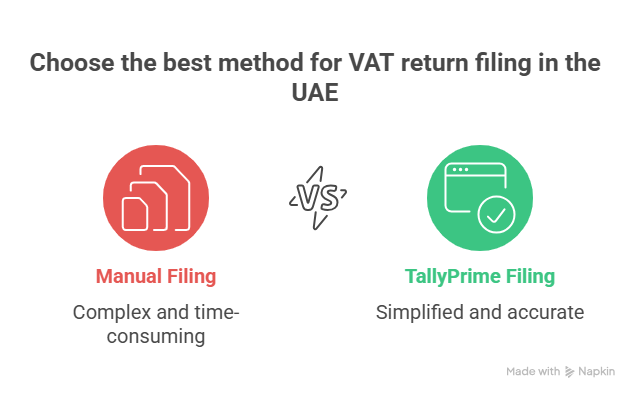
Many businesses still try to manage VAT manually, but this increases the risk of errors and penalties. With TallyPrime, you benefit from:

  • FTA-approved structure – Returns generated precisely as required by law.
  • Accuracy – Automated VAT computation reduces human error.
  • Time efficiency – finishing paperwork in minutes rather than hours.
  • End-to-end compliance – All aspects are addressed, from invoicing to reporting.
  • Scalability – Suitable for startups, medium-sized companies, and major corporations.

Final Words:

Submitting VAT returns in the UAE can be stress-free. Using TallyPrime + TSS allows you to maintain compliance, save time, and prevent expensive errors.
If you’re still submitting VAT by hand or relying on old software, it’s time to make a change. TallyPrime keeps your business prepared for the upcoming return cycle—precise, compliant, and effortless.
Renew your Tally Software Services (TSS) regularly to keep your software updated with the latest VAT formats and FTA requirements.

Business Tip: Always verify your VAT reports in TallyPrime prior to exporting. A brief assessment today prevents FTA questions later.

Get in touch!

Matrix Technologies – Authorized Tally Partner in UAE
📍 Dubai, UAE
📧 Email: sales@tallyprimeerpsoftware.com
📱 Call/WhatsApp: +971-54-586-3379
🌐 Website: www.tallyprimeerpsoftware.com

Stay compliant and stress-free—renew your Tally Software Services (TSS) today and let TallyPrime handle your VAT returns effortlessly!

Why Renew Tally Software Services (TSS) Every Year?

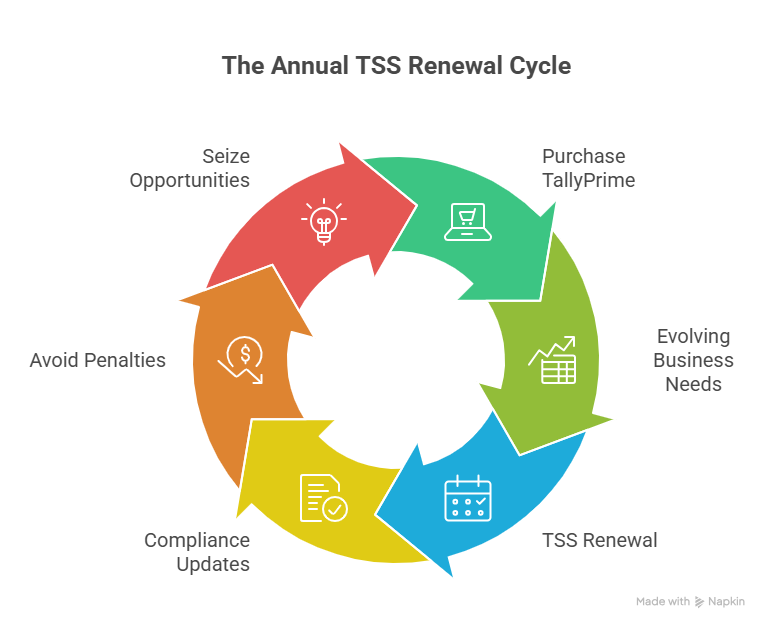
When you first buy TallyPrime, it feels like you’ve got everything you need—smooth accounting, invoicing, inventory, and compliance tools right at your fingertips. But here’s the truth: business and compliance needs are constantly evolving. That’s exactly why Tally Software Services (TSS) exists, and why renewing it every year is not just a formality—it’s an investment that saves you from headaches, penalties, and missed opportunities.

In this blog, let’s break down in simple terms why renewing TSS should always be on your business checklist.

Stay 100% Statutory Compliant (VAT & Corporate Tax)

UAE businesses today are not only bound by VAT laws but also by corporate tax requirements and other statutory rules. With TSS, your TallyPrime keeps pace with all the latest statutory updates.

Here’s how TallyPrime guarantees your compliance:

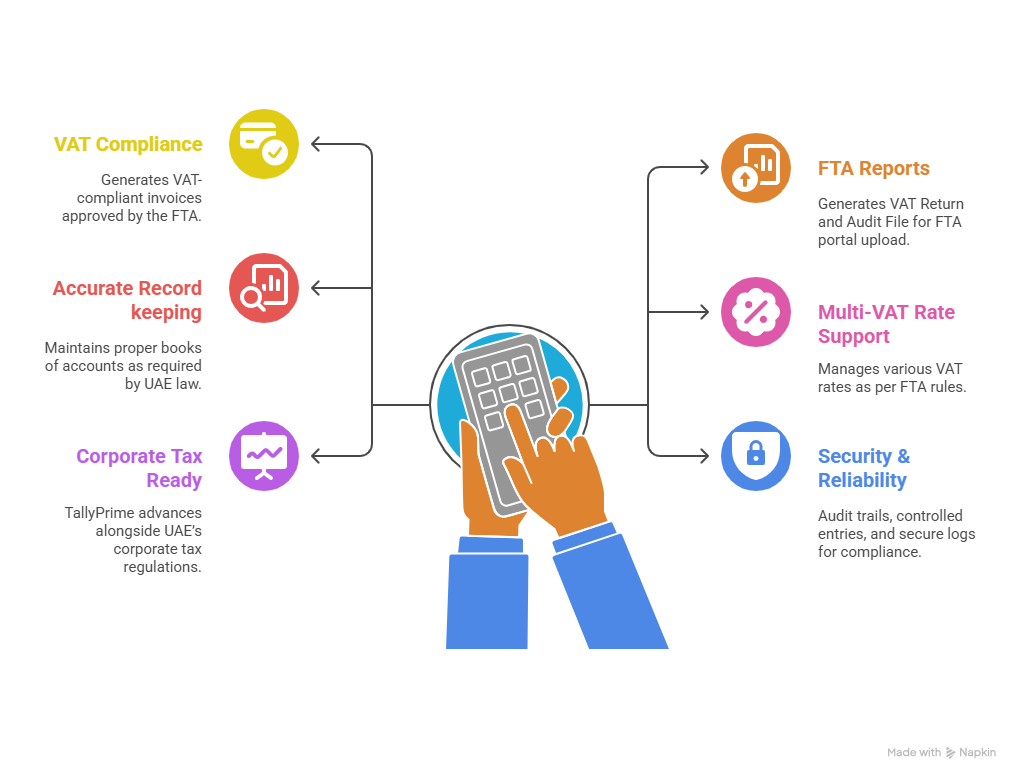
  • VAT Compliance: Tally creates VAT-compliant invoices (Tax Invoice, Simplified Invoice, Credit Note, Debit Note) that have been authorized by the FTA.
  • FTA Reports: Produces audit files (FAF/XML) and VAT returns (Form 201) that may be uploaded straight to the FTA portal.
  • Accurate Record Keeping: As mandated by UAE legislation, maintains appropriate books of accounts. guarantees accurate VAT calculation (input, output, and modifications).
  • Support for Multi-VAT Rates: Handles 5%, zero-rated, exempt, and out-of-scope transactions in accordance with FTA regulations.
  • Corporate Tax Ready: TallyPrime ensures that you remain in compliance with legal requirements by continuously improving alongside the UAE’s corporate tax regulations

Consider TSS as your statutory compliance insurance—constantly ensuring you adhere to the most recent regulations.

Get Access to New Features & Upgrades

Tally isn’t static. Every few months, updates and enhancements are launched, including improved reports, quicker operations, and simpler navigation.

Some benefits include:

  • FTA-ready VAT return formats generated instantly.
  • Corporate Tax tool and updates as new frameworks roll out.
  • Enhanced features that simplify reporting, data management, and user experience.

Every upgrade is designed to save you time and effort, ensuring your business runs without interruptions.

Accessing Your Business Data Remotely

In today’s world, flexibility is everything. TSS gives you secure remote access and web access to your business reports anytime, anywhere, along with the ability to synchronize data across multiple branches or locations.

For example, if you have one branch in Dubai and another in Sharjah, both can keep their records updated in real time. This means no duplicate entries, no delays, and no confusion. Just one unified set of books accessible to all authorized users..

Imagine being able to check your company’s cash flow while traveling or send reports without waiting to get back to the office. With TSS, your business is literally in your pocket.

Banking and Payment Integrations

TSS simplifies the banking process. You have the ability to:

  • Import bank statements straight into Tally.
  • Streamline the reconciliation process.
  • Access new payment gateways as they’re added.

(Currently, direct integration feature is only available with Standard Chartered Bank in the UAE, with more banks to be added in the future.)

This feature alone saves hours of manual work every month.

Security, Fixes & Peace of Mind

Just like your phone or laptop, accounting software needs constant security patches and bug fixes. With TSS, your TallyPrime stays updated, secure, and stable—so you never lose sleep worrying about technical issues.

Without it, you’re running on old, unsupported software, which can be risky for sensitive financial data.

The expense of NOT Renewing is greater.

The most common misunderstanding is: “I can simply use what I already have, so why spend more?”

Consider it, though—

  • One incorrect VAT or Corporate Tax submission can cost more than a year’s TSS renewal.
  • Losing access to remote/web data slows down your business.
  • Outdated software lowers efficiency and puts you behind competitors.

Renewing TSS is not an expense. It’s a small investment for peace of mind, compliance, and productivity.


Final Word: Renew Today, Relax Tomorrow

Your business needs software that evolves alongside it, adjusts to new regulations, and assists you constantly. Renewing TSS guarantees that TallyPrime continues to be your reliable ally in accounting and compliance—not only for today, but also for any challenges that the future may present.

  • Pro Tip: If you renew TSS with Matrix Technologies (Authorized Tally Gold Partner in UAE), you’ll also receive FREE customization support tailored to your business needs. This ensures maximum value for every renewal.

Get in Touch Today!

Matrix Technologies – Authorized Tally Gold Partner in UAE
📍 Dubai, UAE
📧 Email: sales@tallyprimeerpsoftware.com
📱 Call/WhatsApp: +971-54-586-3379
🌐 Website: www.tallyprimeerpsoftware.com
Don’t wait until the last moment—renew your TSS today and keep your business future-ready!

Tally vs Excel

Tally vs Excel: Why UAE Traders Should Upgrade Today

Let’s be honest — if you run a trading business in the UAE, you most likely began by using Excel to handle your accounts. It’s recognizable. It’s fast. At first, it simply just works.

However, as your business expands, things start to get a bit more complicated. Your stock increases, your VAT submissions become complex, and your sales begin pouring in from various sources — that previously reliable spreadsheet starts to seem more like a hassle than a remedy.

So here’s the question: Is it time to move to Tally?

In this blog, we’ll break it down for you — no jargon, no fluff — just a straight-up comparison of Tally vs Excel for UAE traders, and why it might be time to level up.


Excel is Manual. Tally Works Smarter.

Excel depends completely on you. Each formula, each calculation, and each update must be inputted by hand. This implies that even a minor mistake can influence your whole report. It’s not just time-consuming; it’s also risky.

Tally, on the other hand, automates all of this. From automated calculations to real-time data entry, everything is structured to reduce your workload and improve accuracy.

Whether you’re creating invoices, applying VAT, or reviewing financial reports, Tally ensures your data is always clean and reliable.

UAE VAT Compliance: Tally Has You Covered

We all know VAT is a serious deal in the UAE. However, monitoring VAT in Excel? That’s a headache to even think about.

TallyPrime is fully FTA-compliant and ready for VAT — it implements accurate tax rates, creates tax invoices, and organizes your returns without the common mistakes Excel is known for.

  • No more dealing with formulas
  • Eliminate last-minute stress before VAT submission
  • Assurance during examinations

Inventory Management? Tally Wins, Hands Down.

If you’re a trader, your inventory is your lifeline.

In Excel, tracking multiple items, batches, expiry dates, and godowns quickly becomes difficult.
In Tally, inventory control is built-in. You receive instant stock updates, reorder levels, and even item-specific profitability — all with a single click.

Bonus: You can create inventory reports and send them to your internal team — helping your staff stay on top of stock levels, reorders, and daily operations without needing to create anything from scratch.

Time Is Money — Tally Saves You Both

Let’s say it takes you 30 minutes a day to update your Excel sheets. That’s 15 hours a month.

With Tally, every entry syncs automatically — sales, purchases, VAT, inventory, banking, and more. That’s time saved each week.

The time you save can be spent focusing on your customers, growing your business, or simply finding a better work-life balance.

Reports That Actually Make Sense

One of the biggest frustrations with Excel is the difficulty of creating reports. If you’re not an expert, it can take hours to generate a profit and loss statement or a cash flow report.

TallyPrime gives you instant access to 400+ reports. If you wish to check daily sales, pending payments, or a bank reconciliation statement, you can obtain organized, clear reports in only a few clicks.

No formulas, no formatting, no worries.

Built for UAE Businesses

Excel is a general tool. It wasn’t designed specifically for managing businesses, and it certainly wasn’t created with UAE companies in focus.

Tally is different. It’s customized to fulfill the requirements of UAE traders.
TallyPrime integrates effortlessly into the functioning of UAE businesses, offering bilingual invoicing (Arabic and English), VAT-compliant reporting, and even remote access options through the cloud.

Scalability Made Easy

As your business expands, Excel slows you down. Files become excessively large. Mistakes rise. And all at once, it becomes more work just managing your system.

TallyPrime is designed for scalability. Whether you operate as a solo trader or manage several warehouses, it expands alongside you — without needing to “start over.”

Final Thoughts: Don’t Wait for a Crisis to Upgrade

Many businesses in the UAE consider upgrades solely when issues arise — such as an audit, a tax fine, or a lost delivery from inaccurate inventory.

But the smart ones?
They switch before it hurts.

If you are currently managing your trading operations in Excel, it’s an ideal moment to consider TallyPrime. It’s not merely accounting software — it’s a comprehensive business solution tailored for traders in the UAE like yourself.

Ready to Change Things Up?

At Matrix Technologies Trading LLC, we’ve been helping UAE traders and SMEs work smarter since 2010. We’re here to ensure a seamless and hassle-free transition, assisting you with data setup, VAT configuration, and team training.

If you’re ready to work more efficiently, we’re only a call away.

📩 Email: sales@tallyprimeerpsoftware.com
📞 WhatsApp/Call: +971-54-586-3379
🌐 Website: www.tallyprimeerpsoftware.com