


E-Filing Dashboard in TallyPrime UAE

E‑Filing in TallyPrime UAE: Simplifying VAT Returns for Businesses

Let’s be honest. Nothing makes an accountant more anxious than the approaching deadline for completing a VAT return in the fast-paced, high-stakes business environment of the UAE. One incorrect decimal place might result in a penalty notice that severely reduces your profits, and the Federal Tax Authority (FTA) requires accuracy.

For far too long, companies have been fighting two enemies: the never-ending cycle of human data entry and the fear of unclear compliance. After you’ve recorded your sales and totaled your purchases, the last and most important step is to manually upload your complicated books to the EmaraTax portal after converting them into the precise format required by the FTA.

What if, instead, that procedure could be reduced from a stressful weekend to a single, assured click?

Welcome to the future of UAE financial management. Welcome to E-Filing on TallyPrime.

What is E-Filing on TallyPrime UAE? (The Power of “Connected”)

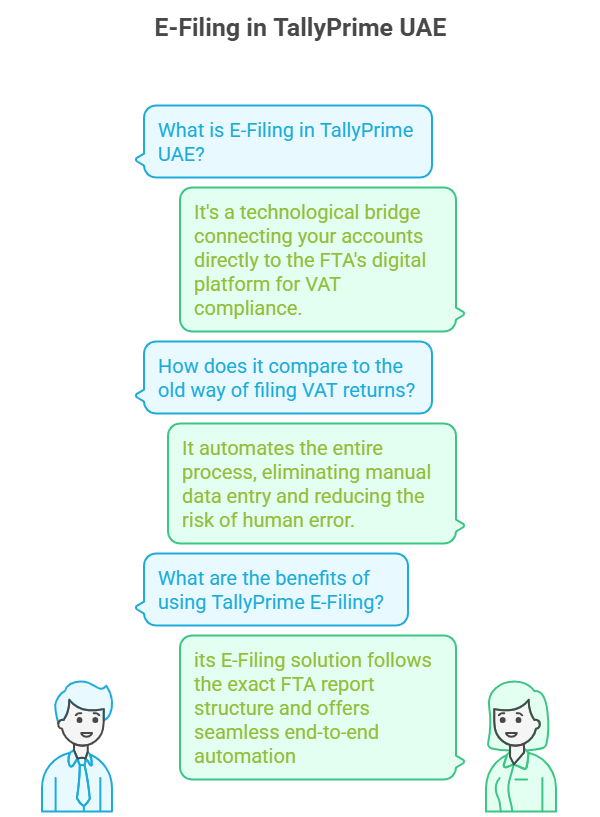
The term E-Filing in TallyPrime UAE is more than just exporting a report; it represents a technological bridge that connects your meticulously managed accounts directly to the Federal Tax Authority’s (FTA) digital platform. Specifically for VAT (Value Added Tax), which remains the cornerstone of UAE tax compliance, TallyPrime offers a Connected VAT Return solution.

Think of it this way: In the old world, you had to print a summary (or export it to Excel), log in separately to the EmaraTax portal, and manually input or upload the data. The chance for human error at that final stage was huge.

The TallyPrime E-Filing solution bypasses this vulnerability. it follows the exact FTA report structure and offers seamless end-to-end automation designed to manage every detail from the moment an invoice is created to the second the final Form 201 is submitted.

This isn’t just about speed; it’s about trust. When your data moves from your accounting records to the regulator’s system with zero human intervention, the accuracy rate approaches 100%.
TallyPrime VAT E-Filing

The Core Difference: Beyond Export

TallyPrime’s E-Filing capability is defined by three key elements, making it the UAE’s gold standard for VAT compliance software:

  1. Direct Data Generation: The software compiles all transactions, segregates them by Emirate (as required), and formats the final report precisely into the FTA’s mandatory structure.
  2. Connected Filing: Advanced versions of TallyPrime allow you to directly interface with the EmaraTax portal. You prepare the return in Tally, generate the required file, and submit it with real-time status updates and confirmations, all while the system automatically populates complex sections like Reverse Charge or Import VAT.
  3. In-Built Error Detection: Prior to submitting any filing, TallyPrime identifies frequent errors—absent TRNs, misclassified tax ledger groups, date errors, or inconsistencies in the Emirate-wise sales breakdown. It requires accurate data prior to producing the return, functioning as your internal pre-audit control. Eliminate concerns about penalties for manual errors.
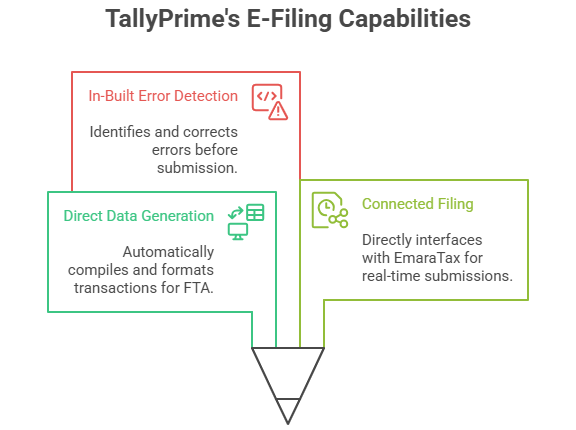
Infographic highlighting key TallyPrime E-Filing capabilities and VAT compliance tools in UAE.

This strong ability provides business owners with a unique advantage: Compliance Confidence.


The E-Filing Workflow: How to File VAT Return in TallyPrime

The entire E-Filing process, once set up correctly, becomes a smooth, repeatable routine. Here is your confident, step-by-step guide to generating and submitting your VAT Return (Form 201) using TallyPrime.

Step 1: The Daily Discipline (Data Entry)

The accuracy of your filing begins with your daily transactions. E-Filing is only as good as the entries you make.

Action: Make sure that each sales invoice, purchase bill, credit note, and expense voucher is entered into TallyPrime with the correct VAT Rate (5%, 0%, Exempt) and the relevant TRN (Tax Registration Number) for your entity.

TallyPrime Benefit: The application guarantees FTA-compliant invoice creation, frequently offering bilingual (Arabic/English) printing and automatically computing the tax element, reducing manual mistakes from the start.

Step 2: Generate the Form 201 Report

This is where TallyPrime’s intelligence takes over.

Action: From the Gateway of Tally, use the Go To feature (Alt+G) and type or select VAT 201.

Review: The report instantly populates the official Form 201 structure. Carefully review the Taxable Sales and Output VAT, and the Taxable Purchases and Recoverable Input VAT sections. Drill down into any line item to see the supporting transactions.

TallyPrime Advantage: Use the Exception Report feature within the VAT 201 screen. This vital tool highlights transactions that might be excluded or require corrections (e.g., incomplete Vouchers, misclassified transactions, or transactions with invalid VAT details). Resolve every exception before proceeding.

Step 3: Save and Export the Return File

Once you are 100% satisfied that your VAT 201 report is accurate and all exceptions are cleared, you lock it in.

Action (Traditional Method): Select the appropriate period, click the Export button, and choose the FTA-prescribed format. Save the file to your computer.

Action (Connected Method): If using the latest TallyPrime releases with connected services, you can often “Submit Return” directly from the TallyPrime screen. The system securely sends the data package to the FTA.

Step 4: Upload to the EmaraTax Portal

If you used the traditional export method, this is the final manual step.

Action: Log in to your company’s account on the official EmaraTax portal.

Process: Go to the VAT Return section for the applicable tax period. Choose the Upload File option and select the file you exported from TallyPrime.

Verification: The FTA system will instantly read the Tally-generated file and populate all the fields in your online Form 201. Crucially, ensure the values match your TallyPrime VAT 201 report exactly.

Step 5: Submission and Payment

The moment of truth—your final compliance commitment.

Action: Examine the auto-filled return one final time for any system mistakes (very unlikely in a TallyPrime file). Press Submit and finish the declaration.

Payment: If the return leads to a Net VAT Payable amount, make the payment promptly using e-Dirham, bank transfer, or GIBAN, ensuring the FTA receives the payment before the deadline


Why E-Filing on TallyPrime is Your Undisputed Advantage

(TallyPrime E-Filing Benefits, Automated Compliance UAE)

In the competitive UAE market, efficiency is the new currency. By mastering E-Filing in TallyPrime, you are not just saving time; you are building a more robust, agile, and auditable business—qualities that attract better investors, partners, and customers.

1. Eliminating Compliance Blind Spots (Risk Mitigation)

E-Filing through TallyPrime means you are always working with the latest FTA formats. This constant updating drastically lowers the risk of penalties—which start at AED 1,000 for a simple late filing and escalate rapidly. Zero penalty risk is the ultimate business advantage.

2. The Audit-Ready Advantage (Transparency)

TallyPrime maintains a complete, digital audit trail. From the moment you save the VAT 201 report to the final submission, every single figure can be traced back to its original invoice. Should the FTA call for an audit, you can instantly generate the required VAT Audit File in the prescribed ASCII format with a single click. This unparalleled data transparency makes audits stress-free.

3. Optimizing Cash Flow (Financial Health)

When your return preparation is reduced from days to minutes, you gain real-time clarity on your tax liability. You know your exact cash position sooner, allowing you to manage your funds and working capital with greater precision. Smarter cash flow management is the direct result of automated compliance.

4. Ultimate Scalability (Future-Proofing)

As your UAE business grows, your transaction volume explodes. A manual process breaks under this stress. TallyPrime handles thousands of entries with the same ease as a handful. It allows you to scale your financial operations indefinitely without hiring an army of data entry staff.


Final Verdict: Move from Anxiety to Authority

If you’re still manually reconciling figures or nervously copying data into the EmaraTax portal, you’re operating with a significant competitive handicap.

E-Filing on TallyPrime UAE is not a luxury; it is a fundamental requirement for any serious business committed to growth and long-term stability in the Emirates. It’s the difference between merely doing business and mastering compliance.

Ready to ditch the filing anxiety? Embrace the precision of TallyPrime and transform your VAT compliance from a deadline scare into an act of confident, effortless financial authority. The time you save is the time you invest back into your business—the ultimate win-win in the UAE’s dynamic economy.

Before the FTA Calls, Call Us.

As a Trusted Tally Gold Partner, Matrix Technologies provides more than software—we deliver 100% FTA Compliance Confidence.


Book Your FREE TallyPrime E-Filing Consultation Today!

Tally on mobile interface showing sales, order, receipt, and report options on smartphone – enabling Tally ERP access for van sales, invoicing, and business management on the go.

Tallymate Taking Tally Beyond the Desktop

Power of Accounting in Your Pocket

In today’s fast-paced business world, one thing is clear: mobility is power. Business owners, accountants, and decision-makers can no longer be restricted to a desk to retrieve essential financial information. Choices can’t postpone until your return to the workplace. Inventory checks need to occur on the warehouse floor. Invoicing should occur immediately after a deal is finalized, not hours later.

This is precisely what TallyMate provides.

TallyMate extends the power of Tally ERP beyond its traditional setup, seamlessly connecting your workflows across devices. Designed for van sales teams, field agents, and dynamic businesses, it provides essential features with innovative tools, offering flexibility and capabilities that go beyond standard Tally.

The Desktop Dilemma: Why Mobile Tally is Non-Negotiable

Before exploring the wonders of TallyMate, let’s recognize the challenges it addresses. Operating a business exclusively with a desktop-based accounting system, even one as powerful as Tally Prime, presents significant risks:

  1. Mobile-First Interface: Designed specifically for smartphones and tablets with clean navigation, role-based dashboards, and touch-friendly entry forms. Everything you need from Tally, simplified for on-the-go use.
  2. Real-Time Invoicing and Orders: Create professional, Tally-compliant invoices or sales orders directly from your phone. Perfect for van sales, on-site billing, and door-to-door distribution teams.
  3. Instant Collections and Receipts: Record payments and receipts instantly — complete with image attachments for proof of payment. Speed up your reconciliation process and maintain accurate ledgers from anywhere.
  4. Enterprise-Grade Security: Built with advanced encryption and secure synchronization. TallyMate allows safe one-way data sync while maintaining role-based access control so every user sees only what they need.
  5. Windows-Compatible Data Entry: Experience seamless data input on mobile that mirrors your Windows-based workflow. All entries sync back effortlessly with your desktop Tally setup for consistency and reliability.

TallyMate addresses these challenges by safely synchronizing your crucial Tally data—whether from TallyPrime or earlier Tally.ERP editions—and displaying it in an easy-to-use, specially designed mobile interface. This is what genuinely distinguishes a simple remote access option from a powerful Tally integration designed for mobile workflow.

Unleashing the Power of TallyMate: Key Features That Define Financial Freedom

TallyMate transforms the way you interact with your financial data. Its strength lies in its ability to translate Tally’s complex power into simple, actionable mobile tools.

1. Real-Time, Role-Based Reporting: Data on Demand

Imagine a scenario: you are in a meeting with a supplier. With TallyMate, you don’t need to call your accountant. You simply pull up the Tally on mobile app and instantly view:

  • Cash & Bank Balances in Real-Time: Track liquidity for prompt payment choices.
  • Sales Performance Dashboards: Monitor daily, weekly, or monthly sales data for any branch or representative.
  • Exceptional Receivables/Payables: Utilize ageing reports to strategize immediate cash collections or supplier payments.

TallyMate’s role-based access is a game-changer. Your sales manager only sees sales reports; your field technician only sees inventory stock; the business owner sees it all. This ensures both security and focus.

2. Seamless Transaction Entry: The Field Agent’s Ledger

One of the most powerful features of TallyMate is its ability to facilitate real-time data entry from any location. This dramatically accelerates the financial closure process and eliminates end-of-day data entry backlogs.

  • Spot Invoicing and Order Booking: Your sales team can generate a professional Tally-compliant invoice or sales order the instant a customer commits. No more manual chits or delayed entries. Perfect for van sales, retail routes, and trade counters.
  • Expense Vouchers on the Go: Field staff can promptly log travel, fuel, or various expenses, frequently attaching a receipt photo. This ensures that reconciliation and audit trails are effortless.
  • Inventory Updates: Check stock by location, adjust quantities after deliveries, and avoid stock-outs. An essential feature for effective inventory management with Tally Prime mobile.

3. Enhanced Security and User Experience: A Secure Mobile Tally

Protection is crucial when handling confidential financial information. TallyMate is established on a base of trust:

  • Enhanced Encryption: The data exchanged between your Tally setup and the mobile application is protected by top-tier encryption standards.
  • One-Way Data Synchronization: All additions made on the phone are safely synchronized to your desktop Tally, while confidential desktop information isn’t kept on the mobile device.
  • User-Friendly Design: TallyMate is specifically crafted for mobile devices, simplifying Tally’s intricate key sequences and layered menus with straightforward, touchscreen-friendly navigation and impressive visuals. This significantly lowers the learning barrier for users without accounting backgrounds.
  • Future-ready web integration: Currently built for mobile + desktop sync; planned web integration will enable browser-based access for managers and remote teams.

Use Cases: How TallyMate Helps Businesses Every Day

  • Van Sales & Field Distribution: Sales reps confirm stock availability, create spot invoices, collect payments, and sync all transactions to Tally — eliminating end-of-day paperwork.
  • For Business Owners: Swiftly examine sales reports, monitor pending payments, and authorize expenses while on the move.
  • For Accountants: Create VAT reports, balance bank accounts, and deliver immediate updates to clients—even when remote.
  • For Sales Teams: Verify stock availability prior to confirming orders with clients.
  • For Leaders: Track team productivity and business KPIs instantly.

Regardless of your position, TallyMate adjusts to suit your requirements.

TallyMate: Powering the Modern Business Owner

For today’s entrepreneur, the idea of “Tally on phone” is no longer a luxury — it’s a necessity for staying efficient and agile. TallyMate was built precisely for this purpose, making your accounting and business management as mobile as you are.

  • How to use Tally on your mobile phone? With TallyMate, the solution is straightforward—sign in, oversee entries, and maintain control from any location.
  • Searching for the top Tally mobile application for Android or iOS? TallyMate provides the familiar Tally experience, redesigned for your mobile device.
  • Require smooth inventory management while on the move? TallyMate assists you in monitoring, synchronizing, and refreshing inventory instantly.

What distinguishes TallyMate is its emphasis on business results, rather than merely on features. It’s about returning your time, enhancing your cash flow clarity, and keeping your data secure.

The Road Ahead — Mobile Today, Web-Ready Tomorrow

TallyMate currently focuses on powerful mobile-first workflows while keeping your desktop Tally as the authoritative ledger. Looking forward, web integration will allow managers and remote teams to access and act from a browser — completing the mobility triangle: desktop + mobile + web.

This phased approach ensures reliable Windows-based data integrity while expanding access and collaboration across platforms.

Conclusion: Run Your Business Anywhere with TallyMate

Adaptability is essential in today’s dynamic corporate environment. Your accounting and management won’t be restricted to an office desk thanks to TallyMate. Whether you’re at work, home, or on the road, having Tally on your phone enables you to manage inventory, van sales, authorize invoices, monitor cash flow, and make decisions instantly.

TallyMate is more than just a smartphone app for professionals, business owners, and growing companies; it’s your trustworthy partner for smart, safe, and simple accounting. If you’ve ever been curious about utilizing Tally on mobile or looked for the top Tally app for Android or iOS, the solution is here.

You can stay ahead of the game at any time and from any location with TallyMate’s effective and portable business management solutions.

Ready to Experience TallyMate?

Don’t just read about it, try it for yourself!
👉 Book Your Free Demo Today or Contact Us to see how TallyMate can transform the way you manage your business.